Join us at FabCon Atlanta from March 16 - 20, 2026, for the ultimate Fabric, Power BI, AI and SQL community-led event. Save $200 with code FABCOMM.
Register now!The Power BI Data Visualization World Championships is back! It's time to submit your entry. Live now!
Hi,
I need some help on using the SWITCH function for dynamis based on a measure.
I tried to add a calculated column which can diplay another column of the same table depending of a value: Value 1 will disply column A, Value 2 will display column B,....
The Value is determined by a measure based on a table not linked to the previous one.
Tables look like:
| Column A | Column B | Column C | SWITCH |
| a | b | c | |
| aa | bb | cc | |
| aaa | bbb | ccc |
| Selection |
| 1 |
| 2 |
| 3 |
So if I select 1 from the Selection Table, then the SWITCH column from the other table will diplay column A.
Value is determined by the following measure:
- Measure = MIN('Selection'[Selection])
SWITCH column is as below:
- SWITCH = SWITCH([Measure];1;[Column A];B;;[Column B];C;;[Column C])
But when I tried to use in a visual I always get Column A in SWITCH whatever is selected in Measure.
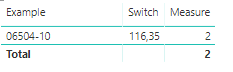
See below an example: we see Measure = 2 & I should see the column B values. But instead I always got the column A
Do you know what is wrong with the Switch function ?
Thanks
Values in a calculated column are fixed. You'll need to create a measure.
Actually I already tried to built it as a measure. The problem is that the measures are added in visuals. As I want to keep the result as a distinct value (no aggregation) I was trying to built it as a custom column.
Is there any option "don't summarize" to apply on measures ? Or any way to change the formulas & make sure all resulta are distincts ?
Thanks
| User | Count |
|---|---|
| 51 | |
| 37 | |
| 31 | |
| 21 | |
| 19 |
| User | Count |
|---|---|
| 138 | |
| 102 | |
| 59 | |
| 36 | |
| 35 |