cancel
Showing results for 
Search instead for 
Did you mean: 

The Power BI Data Visualization World Championships is back! Get ahead of the game and start preparing now! Learn more

Reply
KiranPatil
Frequent Visitor

Funnel Chart Sorting

funnel.PNG


Hi All ,


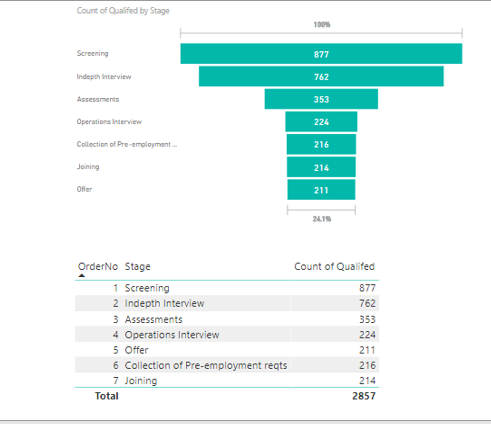
I have trying to create the Funnel Chart , but iam not able to sort by Order no . Below is the table box , i need sorting order of table box in Funnel Chart .

Where should i apply the Sorting and how ?


Advance thanks


1 ACCEPTED SOLUTION
v-danhe-msft
Microsoft Employee
Microsoft Employee

Hi @KiranPatil,

Based on my test, you could refer to below steps:

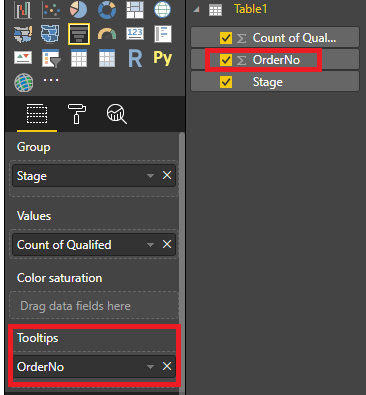
1.Add the [OrderNo] to the Tooltips bucket.

1.PNG

2.Sort the visula by OrderNo.

2.PNG

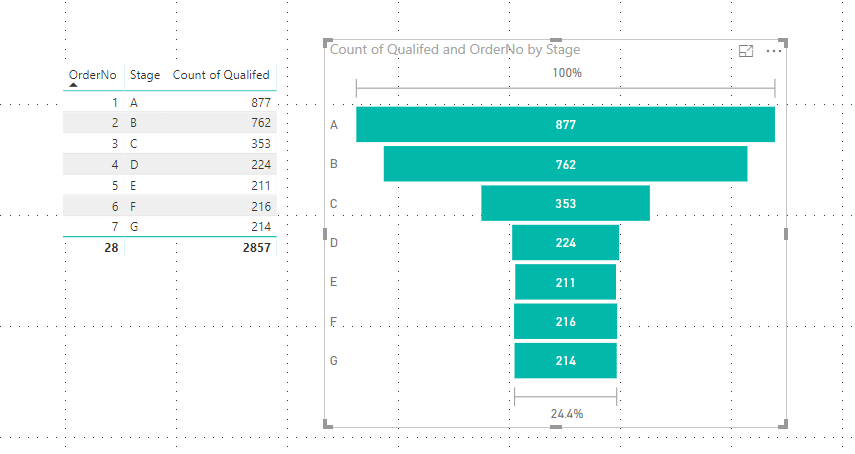
Result:

3.PNG

Hope it could help you.


Regards,

Daniel He

Community Support Team _ Daniel He
If this post helps, then please consider Accept it as the solution to help the other members find it more quickly.

View solution in original post

5 REPLIES 5
v-danhe-msft
Microsoft Employee
Microsoft Employee

Hi @KiranPatil,

Based on my test, you could refer to below steps:

1.Add the [OrderNo] to the Tooltips bucket.

1.PNG

2.Sort the visula by OrderNo.

2.PNG

Result:

3.PNG

Hope it could help you.


Regards,

Daniel He

Community Support Team _ Daniel He
If this post helps, then please consider Accept it as the solution to help the other members find it more quickly.

Hello,

I've been working for 2 hours on this issue and you finally solved it ! Moving an order column to the "tooltip" just made it happen. THANK YOU !!!!

Salvador
Responsive Resident
Responsive Resident

Hello,


Select the Stage column, and then, go to modeling, sort by column, select Order no, that should work. Also, on the visual, on the top right corner, 3 dots should be displayed when pointing it the funnel with the mouse, and there is an order by option, but it only orders by data contained in the funnel.

Hi @KiranPatil,

Could you please tell me if your problem has been solved? If it is, could you please mark the helpful replies as Answered?


Regards,

Daniel He

Community Support Team _ Daniel He
If this post helps, then please consider Accept it as the solution to help the other members find it more quickly.

Hello @v-danhe-msft,


It was @KiranPatil's problem, I just suggested a solution 😛


Regards,

Salva.

Helpful resources

Announcements
Power BI DataViz World Championships

Power BI Dataviz World Championships

The Power BI Data Visualization World Championships is back! Get ahead of the game and start preparing now!

December 2025 Power BI Update Carousel

Power BI Monthly Update - December 2025

Check out the December 2025 Power BI Holiday Recap!

FabCon Atlanta 2026 carousel

FabCon Atlanta 2026

Join us at FabCon Atlanta, March 16-20, for the ultimate Fabric, Power BI, AI and SQL community-led event. Save $200 with code FABCOMM.