Share feedback directly with Fabric product managers, participate in targeted research studies and influence the Fabric roadmap.
Sign up nowGet Fabric certified for FREE! Don't miss your chance! Learn more
Hi All ,
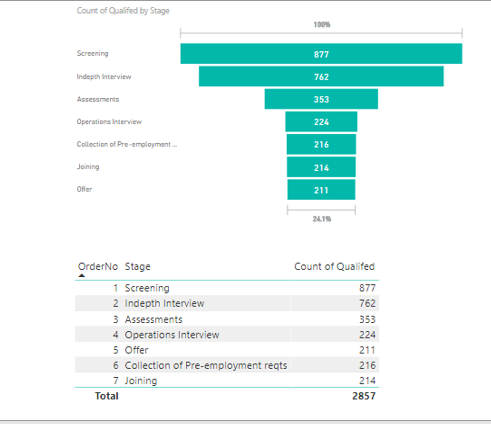
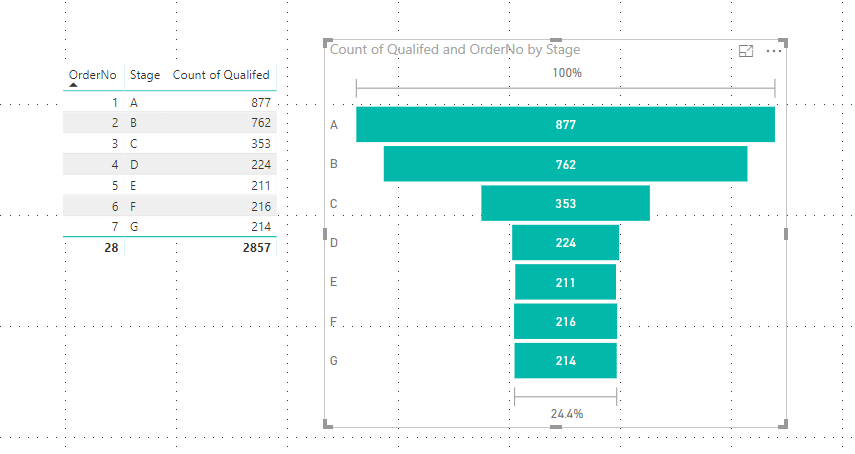
I have trying to create the Funnel Chart , but iam not able to sort by Order no . Below is the table box , i need sorting order of table box in Funnel Chart .
Where should i apply the Sorting and how ?
Advance thanks
Solved! Go to Solution.
Hi @KiranPatil,
Based on my test, you could refer to below steps:
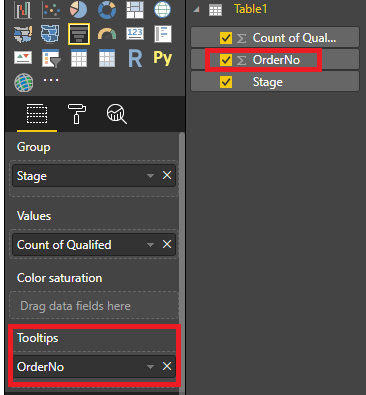
1.Add the [OrderNo] to the Tooltips bucket.
2.Sort the visula by OrderNo.
Result:
Hope it could help you.
Regards,
Daniel He
Hi @KiranPatil,
Based on my test, you could refer to below steps:
1.Add the [OrderNo] to the Tooltips bucket.
2.Sort the visula by OrderNo.
Result:
Hope it could help you.
Regards,
Daniel He
Hello,
I've been working for 2 hours on this issue and you finally solved it ! Moving an order column to the "tooltip" just made it happen. THANK YOU !!!!
Hello,
Select the Stage column, and then, go to modeling, sort by column, select Order no, that should work. Also, on the visual, on the top right corner, 3 dots should be displayed when pointing it the funnel with the mouse, and there is an order by option, but it only orders by data contained in the funnel.
Hi @KiranPatil,
Could you please tell me if your problem has been solved? If it is, could you please mark the helpful replies as Answered?
Regards,
Daniel He
If you love stickers, then you will definitely want to check out our Community Sticker Challenge!
Check out the January 2026 Power BI update to learn about new features.
| User | Count |
|---|---|
| 64 | |
| 63 | |
| 49 | |
| 21 | |
| 18 |
| User | Count |
|---|---|
| 122 | |
| 120 | |
| 38 | |
| 36 | |
| 29 |