Don't miss your chance to take the Fabric Data Engineer (DP-700) exam on us!
Learn moreNext up in the FabCon + SQLCon recap series: The roadmap for Microsoft SQL and Maximizing Developer experiences in Fabric. All sessions are available on-demand after the live show. Register now
Hello folks,
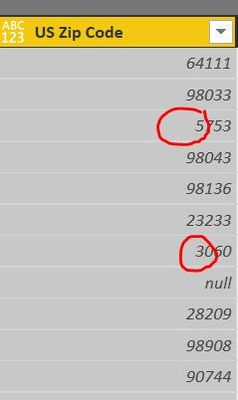
I was wondering how you handle the missing 0's in US Zipcodes?
Thank you
Solved! Go to Solution.
Convert the Column to Data Type Text in the Query Editor!
Click the icon on the left side of the Column name and select Text
This should fix it! ![]()
Convert the Column to Data Type Text in the Query Editor!
Click the icon on the left side of the Column name and select Text
This should fix it! ![]()
Changing the data type to text does not restore the leading zero in the zipcode text string, nor does it allow refreshing the data to include the leading zero from an Excel spreadsheet. I need the leading zero for proper sorting of the data.
Any suggestions?
Are the zeroes present in the Excel spreadsheet? Is the data formatted as text in the spreadsheet? Excel does some things to guess what the user is looking for and sometimes guesses wrong.
Try this: https://community.powerbi.com/t5/Desktop/Leading-Zero/td-p/23131
If you have recently started exploring Fabric, we'd love to hear how it's going. Your feedback can help with product improvements.
A new Power BI DataViz World Championship is coming this June! Don't miss out on submitting your entry.
Share feedback directly with Fabric product managers, participate in targeted research studies and influence the Fabric roadmap.
| User | Count |
|---|---|
| 49 | |
| 44 | |
| 43 | |
| 19 | |
| 18 |
| User | Count |
|---|---|
| 73 | |
| 71 | |
| 34 | |
| 33 | |
| 31 |