cancel
Showing results for 
Search instead for 
Did you mean: 

The Power BI Data Visualization World Championships is back! Get ahead of the game and start preparing now! Learn more

Reply
Kipple123
Frequent Visitor

Adding Customers First Purchase Type to All Rows

I'm trying to add a calculated column to my table so that I can slice the data by the marketplace that customers were aquired on so I can do lifetime value analysis.  I've got a ranking function that's working and labels each customer's order as first order, second order, etc... Now I want to add a column that takes the marketplace [type] of the 1st order and puts it on all rows.  I've been trying to use an If function but it's not working since it only looks each row's context.  Each customer has it's own unique customerID which is what I would like to use to filter/assign the first purchase type to.


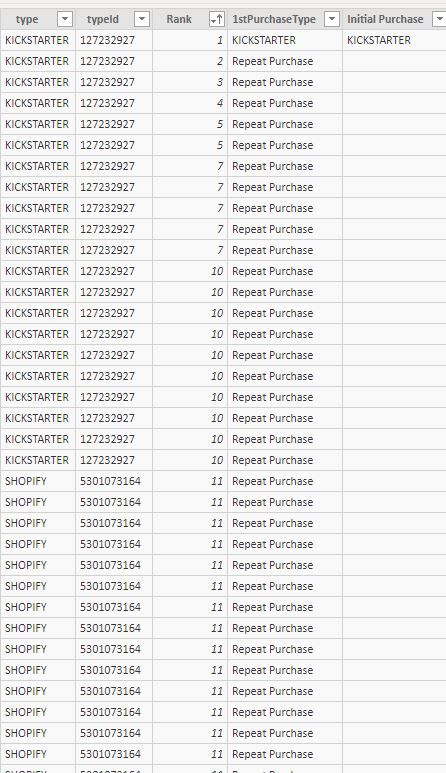
For the table below I would like to change Repeat Purchase to Kickstarter in this instance, since the first purchase this customer made was on Kickstarter.  My calculated colum is using this:


1stPurchaseType = IF([Rank]=1,Sales[type],"Repeat Purchase")
 
I haven't been able to figure out how to get the else condition to return the sales[type] of the row with [rank]=1


first purchase type help.JPG

1 ACCEPTED SOLUTION

I've got a work around functioning but I think there should be a more elegant solution to the problem.


Here's the work around:

In Power Query convert the Type to a number, (e.g. kickstarter = 1, amazon = 2, etc...) by adding a conditional column(NumberType).


Then in PowerBi assign an initial purchase type using this DAX:

Initial Purchase = VALUE(CALCULATE(MAX(Sales[NumberType]),ALLEXCEPT(Sales,Sales[customerId]),Sales[Rank]==1))


Then convert that back to a string using a switch function:

FirstPurchaseType = SWITCH(Sales[Initial Purchase], 1, "KICKSTARTER", 2, "AMAZON", 3, "SHOPIFY", 4, "WALMART", "OTHER")

View solution in original post

3 REPLIES 3
v-yuta-msft
Community Support
Community Support

@Kipple123 ,


@Kipple123 wrote:

I'm trying to add a calculated column to my table so that I can slice the data by the marketplace that customers were aquired on so I can do lifetime value analysis.  I've got a ranking function that's working and labels each customer's order as first order, second order, etc... Now I want to add a column that takes the marketplace [type] of the 1st order and puts it on all rows.  I've been trying to use an If function but it's not working since it only looks each row's context.  Each customer has it's own unique customerID which is what I would like to use to filter/assign the first purchase type to.


I'm afraid I could not find the customerID in your sample data. And could you clarify more details about the first customer purchase and show the expected result if possible?


Regards,

Jimmy Tao

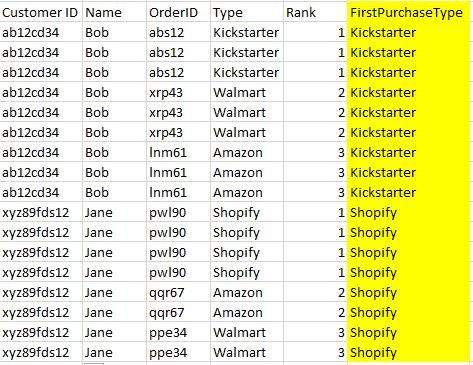
@v-yuta-msft Thanks for helping out.  Here's some simplified sample data:


first purchase type help - simple.JPG


I'm trying to add the column in yellow, where each customer ID is labeled by the market place where they made their first purchase.  I'm trying to do this so that I can calculate lifetime value of customers acquired on different platforms.  I also am interested in doing analysis such as, if the first purchase type is Kickstarter, what % of those customers make a later purchase on Amazon.  The rank column labels each line as being the customers 1st purchase, 2nd purchase, etc....

I've got a work around functioning but I think there should be a more elegant solution to the problem.


Here's the work around:

In Power Query convert the Type to a number, (e.g. kickstarter = 1, amazon = 2, etc...) by adding a conditional column(NumberType).


Then in PowerBi assign an initial purchase type using this DAX:

Initial Purchase = VALUE(CALCULATE(MAX(Sales[NumberType]),ALLEXCEPT(Sales,Sales[customerId]),Sales[Rank]==1))


Then convert that back to a string using a switch function:

FirstPurchaseType = SWITCH(Sales[Initial Purchase], 1, "KICKSTARTER", 2, "AMAZON", 3, "SHOPIFY", 4, "WALMART", "OTHER")

Helpful resources

Announcements
Power BI DataViz World Championships

Power BI Dataviz World Championships

The Power BI Data Visualization World Championships is back! Get ahead of the game and start preparing now!

December 2025 Power BI Update Carousel

Power BI Monthly Update - December 2025

Check out the December 2025 Power BI Holiday Recap!

FabCon Atlanta 2026 carousel

FabCon Atlanta 2026

Join us at FabCon Atlanta, March 16-20, for the ultimate Fabric, Power BI, AI and SQL community-led event. Save $200 with code FABCOMM.