cancel
Showing results for 
Search instead for 
Did you mean: 

July 7 - July 17 | Round 2 of the Power BI Dataviz World Championships. Don't miss your chance! Learn more

Reply
Kipple123
Frequent Visitor

Adding Customers First Purchase Type to All Rows

I'm trying to add a calculated column to my table so that I can slice the data by the marketplace that customers were aquired on so I can do lifetime value analysis.  I've got a ranking function that's working and labels each customer's order as first order, second order, etc... Now I want to add a column that takes the marketplace [type] of the 1st order and puts it on all rows.  I've been trying to use an If function but it's not working since it only looks each row's context.  Each customer has it's own unique customerID which is what I would like to use to filter/assign the first purchase type to.


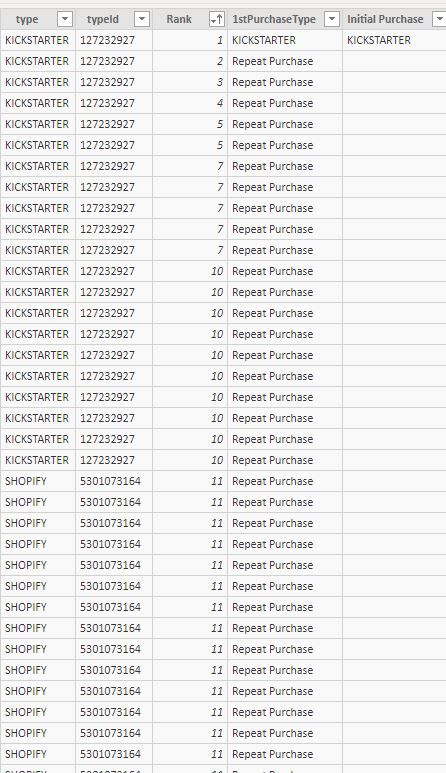
For the table below I would like to change Repeat Purchase to Kickstarter in this instance, since the first purchase this customer made was on Kickstarter.  My calculated colum is using this:


1stPurchaseType = IF([Rank]=1,Sales[type],"Repeat Purchase")
 
I haven't been able to figure out how to get the else condition to return the sales[type] of the row with [rank]=1


first purchase type help.JPG

1 ACCEPTED SOLUTION

I've got a work around functioning but I think there should be a more elegant solution to the problem.


Here's the work around:

In Power Query convert the Type to a number, (e.g. kickstarter = 1, amazon = 2, etc...) by adding a conditional column(NumberType).


Then in PowerBi assign an initial purchase type using this DAX:

Initial Purchase = VALUE(CALCULATE(MAX(Sales[NumberType]),ALLEXCEPT(Sales,Sales[customerId]),Sales[Rank]==1))


Then convert that back to a string using a switch function:

FirstPurchaseType = SWITCH(Sales[Initial Purchase], 1, "KICKSTARTER", 2, "AMAZON", 3, "SHOPIFY", 4, "WALMART", "OTHER")

View solution in original post

3 REPLIES 3
v-yuta-msft
Community Support
Community Support

@Kipple123 ,


@Kipple123 wrote:

I'm trying to add a calculated column to my table so that I can slice the data by the marketplace that customers were aquired on so I can do lifetime value analysis.  I've got a ranking function that's working and labels each customer's order as first order, second order, etc... Now I want to add a column that takes the marketplace [type] of the 1st order and puts it on all rows.  I've been trying to use an If function but it's not working since it only looks each row's context.  Each customer has it's own unique customerID which is what I would like to use to filter/assign the first purchase type to.


I'm afraid I could not find the customerID in your sample data. And could you clarify more details about the first customer purchase and show the expected result if possible?


Regards,

Jimmy Tao

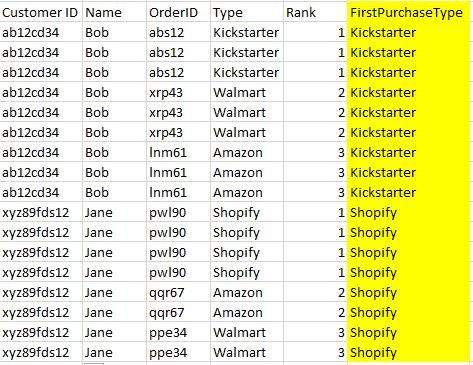
@v-yuta-msft Thanks for helping out.  Here's some simplified sample data:


first purchase type help - simple.JPG


I'm trying to add the column in yellow, where each customer ID is labeled by the market place where they made their first purchase.  I'm trying to do this so that I can calculate lifetime value of customers acquired on different platforms.  I also am interested in doing analysis such as, if the first purchase type is Kickstarter, what % of those customers make a later purchase on Amazon.  The rank column labels each line as being the customers 1st purchase, 2nd purchase, etc....

I've got a work around functioning but I think there should be a more elegant solution to the problem.


Here's the work around:

In Power Query convert the Type to a number, (e.g. kickstarter = 1, amazon = 2, etc...) by adding a conditional column(NumberType).


Then in PowerBi assign an initial purchase type using this DAX:

Initial Purchase = VALUE(CALCULATE(MAX(Sales[NumberType]),ALLEXCEPT(Sales,Sales[customerId]),Sales[Rank]==1))


Then convert that back to a string using a switch function:

FirstPurchaseType = SWITCH(Sales[Initial Purchase], 1, "KICKSTARTER", 2, "AMAZON", 3, "SHOPIFY", 4, "WALMART", "OTHER")

Helpful resources

Announcements
FabCon and SQLCon Barcelona 2026

FabCon & SQLCon – Barcelona 2026

Join us in Barcelona for FabCon and SQLCon, the Fabric, Power BI, SQL, and AI community event. Save €200 with code FABCMTY200.

60 days of Data Days Carousel

Data Days 2026

Join Data Days 2026: 60 days of free live/on-demand sessions, challenges, study groups, and certification opportunities.

Power BI DataViz World Championships carousel

Power BI DataViz World Championships - June 2026

A new Power BI DataViz World Championship is coming this June! Don't miss out on submitting your entry.

Top Solution Authors