Join us at FabCon Atlanta from March 16 - 20, 2026, for the ultimate Fabric, Power BI, AI and SQL community-led event. Save $200 with code FABCOMM.
Register now!The Power BI Data Visualization World Championships is back! Get ahead of the game and start preparing now! Learn more
Hello folks,
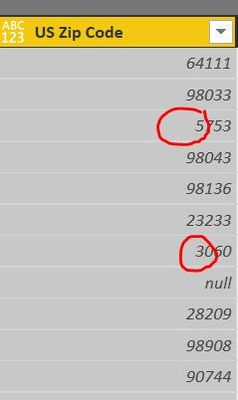
I was wondering how you handle the missing 0's in US Zipcodes?
Thank you
Solved! Go to Solution.
Convert the Column to Data Type Text in the Query Editor!
Click the icon on the left side of the Column name and select Text
This should fix it! ![]()
Convert the Column to Data Type Text in the Query Editor!
Click the icon on the left side of the Column name and select Text
This should fix it! ![]()
Changing the data type to text does not restore the leading zero in the zipcode text string, nor does it allow refreshing the data to include the leading zero from an Excel spreadsheet. I need the leading zero for proper sorting of the data.
Any suggestions?
Are the zeroes present in the Excel spreadsheet? Is the data formatted as text in the spreadsheet? Excel does some things to guess what the user is looking for and sometimes guesses wrong.
Try this: https://community.powerbi.com/t5/Desktop/Leading-Zero/td-p/23131
The Power BI Data Visualization World Championships is back! Get ahead of the game and start preparing now!
| User | Count |
|---|---|
| 39 | |
| 37 | |
| 33 | |
| 32 | |
| 29 |
| User | Count |
|---|---|
| 133 | |
| 88 | |
| 85 | |
| 68 | |
| 64 |