This is best Fabric, Power BI, SQL and AI community event. How do we know? The last event sold out! Save €200 with code FABCMTY200.
Register nowA new Data Days event is coming soon! This time we’re going bigger than ever. Fabric, Power BI, SQL, AI and more. Don't miss out.
Hi PB Experts,
I've tried hard to create a table but fail.
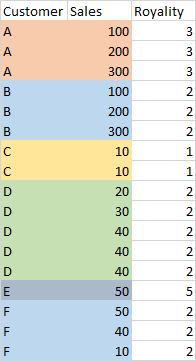
The data are simplified as this
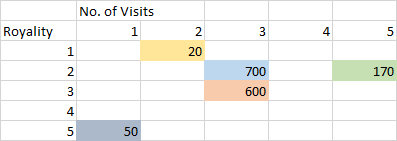
I would like to make a matrix table, no. of visit (no. of Sales) will be displayed in column
This is the expected result:
Here is the PBIX Download .
wish that somebody can help, many thanks!
Solved! Go to Solution.
hi @Anonymous
For your case, just create a measure with logic as below:
Result =
VAR _table =
FILTER (
CROSSJOIN (
SUMMARIZE (
'Table',
'Table'[Royality],
'Table'[Customer],
"Totalsales", CALCULATE ( SUM ( 'Table'[Sales] ) ),
"Frequency", CALCULATE ( COUNTA ( 'Table'[Customer] ) )
),
Visit
),
[Frequency] = [Value]
)
RETURN
SUMX ( _table, [Totalsales] )
Result:
Regards,
Lin
hi @Anonymous
For your case, just create a measure with logic as below:
Result =
VAR _table =
FILTER (
CROSSJOIN (
SUMMARIZE (
'Table',
'Table'[Royality],
'Table'[Customer],
"Totalsales", CALCULATE ( SUM ( 'Table'[Sales] ) ),
"Frequency", CALCULATE ( COUNTA ( 'Table'[Customer] ) )
),
Visit
),
[Frequency] = [Value]
)
RETURN
SUMX ( _table, [Totalsales] )
Result:
Regards,
Lin
A million thanks! This question has been struggling me for a few days
Hi @Anonymous ,
Use this code to transform your data first:
let
Source = Table.FromRows(Json.Document(Binary.Decompress(Binary.FromText("i45WclTSUTI0MACSxkqxOhC+ERrfGInvBFdvBOcbofGNkfjOYPUgAhvXBawbrtgFrBmFa0Is1xXIMgVxTcFcNxjXCM41QeUaQrmxAA==", BinaryEncoding.Base64), Compression.Deflate)), let _t = ((type nullable text) meta [Serialized.Text = true]) in type table [Customer = _t, Sales = _t, Royality = _t]),
chgSalesType = Table.TransformColumnTypes(Source,{{"Sales", Int64.Type}}),
#"groupRows&Count" = Table.Group(chgSalesType, {"Customer", "Royality"}, {{"sales", each List.Sum([Sales]), type number}, {"visits", each Table.RowCount(_), Int64.Type}}),
chgVisitsType = Table.TransformColumnTypes(#"groupRows&Count",{{"visits", type text}})
in
chgVisitsTypeIn Power Query, go to New Source > Blank Query then in Advanced Editor paste my code over the default code.
Then in the report view, set up your matrix like this:
Pete
Proud to be a Datanaut!
@Anonymous , see if segmentation can help for frequency
https://www.daxpatterns.com/dynamic-segmentation/
https://www.daxpatterns.com/static-segmentation/
https://www.poweredsolutions.co/2020/01/11/dax-vs-power-query-static-segmentation-in-power-bi-dax-po...
https://radacad.com/grouping-and-binning-step-towards-better-data-visualization
Check out the May 2026 Power BI update to learn about new features.
Sign up to receive a private message when registration opens and key events begin.
If you have recently started exploring Fabric, we'd love to hear how it's going. Your feedback can help with product improvements.
| User | Count |
|---|---|
| 28 | |
| 24 | |
| 23 | |
| 19 | |
| 16 |
| User | Count |
|---|---|
| 52 | |
| 49 | |
| 39 | |
| 20 | |
| 20 |