cancel
Showing results for 
Search instead for 
Did you mean: 

Get Fabric Certified for FREE during Fabric Data Days. Don't miss your chance! Request now

Reply
ajbogle
Helper I
Helper I

First Date based on Column Type

Hello,


The subject is essentially what I am after and I feel like I am 90% of the way there but when I click on a Calender Month/Year it changes my desired results.


Redesign Customer =


CALCULATE(
        MIN('SLA: Design'[Design Queued]),
            ALLEXCEPT ( 'SLA: Design', 'SLA: Design'[RID]),
            'SLA: Design'[Type] = "Redesign: Customer"
        )


Total Duration =


MEDIANX(
      SUMMARIZE('SLA: Design', 'SLA: Design'[Design Approved],
      "Date Difference", 
      AVERAGEX('SLA: Design', 
              DATEDIFF([Redesign Customer], 'SLA: Design'[Design Approved], DAY))
                ),
      [Date Difference] 
),​


This initially returns the correct result:
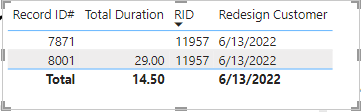
ajbogle_0-1669076729455.png


However, if I click on a Month/Year filter it changes the results to the first queued date from the 8001 record and I want it to ignore all filters and retain the 6/13/2022 date as I need the 'Total Duration' = 29. 


Additionally, I'd love to not include the null value in the Total Duration as it should be 29 and not 14.50. Let me know if I need to provide anymore measures for context.


Thanks!


EDIT: Adding 'Total Duration' measure

1 ACCEPTED SOLUTION

I've tried adding ALL into the redesign variable but still changes the date unfortuantely. And I got the Total Duration figured out, instead of summarizing over [Design Approved] I did it over the Primary Key which is RID and that resolved that issue.

View solution in original post

2 REPLIES 2
danextian
Super User
Super User

Hi @ajbogle ,


You can add another argument to your existing formula. That should be something like:

Redesign Customer =
CALCULATE (
    MIN ( 'SLA: Design'[Design Queued] ),
    ALLEXCEPT ( 'SLA: Design', 'SLA: Design'[RID] ),
    ALL ( 'SLA: Design'[Record ID #] ),
    'SLA: Design'[Type] = "Redesign: Customer"
)


For the duration, how do you calculate it? It appers it is being averaged (29/2 = 14.5)


Dane Belarmino | Microsoft MVP | Proud to be a Super User!

Did I answer your question? Mark my post as a solution!


"Tell me and I’ll forget; show me and I may remember; involve me and I’ll understand."
Need Power BI consultation, get in touch with me on LinkedIn or hire me on UpWork.
Learn with me on YouTube @DAXJutsu or follow my page on Facebook @DAXJutsuPBI.

I've tried adding ALL into the redesign variable but still changes the date unfortuantely. And I got the Total Duration figured out, instead of summarizing over [Design Approved] I did it over the Primary Key which is RID and that resolved that issue.

Helpful resources

Announcements
Fabric Data Days Carousel

Fabric Data Days

Advance your Data & AI career with 50 days of live learning, contests, hands-on challenges, study groups & certifications and more!

October Power BI Update Carousel

Power BI Monthly Update - October 2025

Check out the October 2025 Power BI update to learn about new features.

FabCon Atlanta 2026 carousel

FabCon Atlanta 2026

Join us at FabCon Atlanta, March 16-20, for the ultimate Fabric, Power BI, AI and SQL community-led event. Save $200 with code FABCOMM.

Top Solution Authors