cancel
Showing results for 
Search instead for 
Did you mean: 

Learn from the best! Meet the four finalists headed to the FINALS of the Power BI Dataviz World Championships! Register now

Reply
ajbogle
Helper I
Helper I

First Date based on Column Type

Hello,


The subject is essentially what I am after and I feel like I am 90% of the way there but when I click on a Calender Month/Year it changes my desired results.


Redesign Customer =


CALCULATE(
        MIN('SLA: Design'[Design Queued]),
            ALLEXCEPT ( 'SLA: Design', 'SLA: Design'[RID]),
            'SLA: Design'[Type] = "Redesign: Customer"
        )


Total Duration =


MEDIANX(
      SUMMARIZE('SLA: Design', 'SLA: Design'[Design Approved],
      "Date Difference", 
      AVERAGEX('SLA: Design', 
              DATEDIFF([Redesign Customer], 'SLA: Design'[Design Approved], DAY))
                ),
      [Date Difference] 
),​


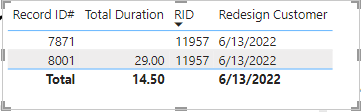
This initially returns the correct result:
ajbogle_0-1669076729455.png


However, if I click on a Month/Year filter it changes the results to the first queued date from the 8001 record and I want it to ignore all filters and retain the 6/13/2022 date as I need the 'Total Duration' = 29. 


Additionally, I'd love to not include the null value in the Total Duration as it should be 29 and not 14.50. Let me know if I need to provide anymore measures for context.


Thanks!


EDIT: Adding 'Total Duration' measure

1 ACCEPTED SOLUTION

I've tried adding ALL into the redesign variable but still changes the date unfortuantely. And I got the Total Duration figured out, instead of summarizing over [Design Approved] I did it over the Primary Key which is RID and that resolved that issue.

View solution in original post

2 REPLIES 2
danextian
Super User
Super User

Hi @ajbogle ,


You can add another argument to your existing formula. That should be something like:

Redesign Customer =
CALCULATE (
    MIN ( 'SLA: Design'[Design Queued] ),
    ALLEXCEPT ( 'SLA: Design', 'SLA: Design'[RID] ),
    ALL ( 'SLA: Design'[Record ID #] ),
    'SLA: Design'[Type] = "Redesign: Customer"
)


For the duration, how do you calculate it? It appers it is being averaged (29/2 = 14.5)


Dane Belarmino | Microsoft MVP | Proud to be a Super User!

Did I answer your question? Mark my post as a solution!


"Tell me and I’ll forget; show me and I may remember; involve me and I’ll understand."
Need Power BI consultation, get in touch with me on LinkedIn or hire me on UpWork.
Learn with me on YouTube @DAXJutsu or follow my page on Facebook @DAXJutsuPBI.

I've tried adding ALL into the redesign variable but still changes the date unfortuantely. And I got the Total Duration figured out, instead of summarizing over [Design Approved] I did it over the Primary Key which is RID and that resolved that issue.

Helpful resources

Announcements
Join our Fabric User Panel

Join our Fabric User Panel

Share feedback directly with Fabric product managers, participate in targeted research studies and influence the Fabric roadmap.

March Power BI Update Carousel

Power BI Community Update - March 2026

Check out the March 2026 Power BI update to learn about new features.