This is best Fabric, Power BI, SQL and AI community event. How do we know? The last event sold out! Save €200 with code FABCMTY200.
Register nowA new Data Days event is coming soon! This time we’re going bigger than ever. Fabric, Power BI, SQL, AI and more. Don't miss out.
Hello,
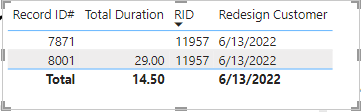
The subject is essentially what I am after and I feel like I am 90% of the way there but when I click on a Calender Month/Year it changes my desired results.
Redesign Customer =
CALCULATE(
MIN('SLA: Design'[Design Queued]),
ALLEXCEPT ( 'SLA: Design', 'SLA: Design'[RID]),
'SLA: Design'[Type] = "Redesign: Customer"
)
MEDIANX(
SUMMARIZE('SLA: Design', 'SLA: Design'[Design Approved],
"Date Difference",
AVERAGEX('SLA: Design',
DATEDIFF([Redesign Customer], 'SLA: Design'[Design Approved], DAY))
),
[Date Difference]
),
However, if I click on a Month/Year filter it changes the results to the first queued date from the 8001 record and I want it to ignore all filters and retain the 6/13/2022 date as I need the 'Total Duration' = 29.
Additionally, I'd love to not include the null value in the Total Duration as it should be 29 and not 14.50. Let me know if I need to provide anymore measures for context.
Thanks!
EDIT: Adding 'Total Duration' measure
Solved! Go to Solution.
I've tried adding ALL into the redesign variable but still changes the date unfortuantely. And I got the Total Duration figured out, instead of summarizing over [Design Approved] I did it over the Primary Key which is RID and that resolved that issue.
Hi @ajbogle ,
You can add another argument to your existing formula. That should be something like:
Redesign Customer =
CALCULATE (
MIN ( 'SLA: Design'[Design Queued] ),
ALLEXCEPT ( 'SLA: Design', 'SLA: Design'[RID] ),
ALL ( 'SLA: Design'[Record ID #] ),
'SLA: Design'[Type] = "Redesign: Customer"
)
For the duration, how do you calculate it? It appers it is being averaged (29/2 = 14.5)
I've tried adding ALL into the redesign variable but still changes the date unfortuantely. And I got the Total Duration figured out, instead of summarizing over [Design Approved] I did it over the Primary Key which is RID and that resolved that issue.
Check out the May 2026 Power BI update to learn about new features.
Sign up to receive a private message when registration opens and key events begin.
If you have recently started exploring Fabric, we'd love to hear how it's going. Your feedback can help with product improvements.
| User | Count |
|---|---|
| 30 | |
| 28 | |
| 23 | |
| 19 | |
| 17 |
| User | Count |
|---|---|
| 48 | |
| 46 | |
| 41 | |
| 21 | |
| 18 |