Don't miss your chance to take exam DP-600 or DP-700 on us!
Request nowLearn from the best! Meet the four finalists headed to the FINALS of the Power BI Dataviz World Championships! Register now
Shop1 has 2 areas A or B so i need to be able to create a messure to seperate this
| area | Code | shop 1 | shop 2 | shop 3 |
| A | 311 | 1 | ||
| B | 311 | 1 | ||
| A | 311 | 1 | 1 | 1 |
| B | 234 | 1 | ||
| A | 112 | 1 | 1 | |
| B | 112 | 1 |
Epected results
| A | 311 | Shop 1 | 2 |
| B | 311 | Shop 1 | 1 |
| A | 112 | Shop 1 | 1 |
| B | 112 | Shop 1 | 1 |
| B | 311 | shop 2 | 1 |
| B | 234 | shop 2 | 1 |
| B | 311 | shop3 | 1 |
| A | 112 | shop3 | 1 |
How can you filter shop1 based on the A&B column ?
Solved! Go to Solution.
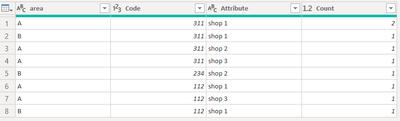
Here's one way to do it in the query editor. To see how it works, just create a blank query, open the Advanced Editor and replace the text there with the M code below.
let
Source = Table.FromRows(Json.Document(Binary.Decompress(Binary.FromText("i45WclTSUTI2NASSIKwAxrE60UpOOMRR1UMwTL2RsQlUrSGKekNDIyRzEOpRxYHqYwE=", BinaryEncoding.Base64), Compression.Deflate)), let _t = ((type nullable text) meta [Serialized.Text = true]) in type table [area = _t, #"Code " = _t, #"shop 1" = _t, #"shop 2" = _t, #"shop 3" = _t]),
#"Changed Type" = Table.TransformColumnTypes(Source,{{"area", type text}, {"Code ", Int64.Type}, {"shop 1", Int64.Type}, {"shop 2", Int64.Type}, {"shop 3", Int64.Type}}),
#"Unpivoted Other Columns" = Table.UnpivotOtherColumns(#"Changed Type", {"area", "Code "}, "Attribute", "Value"),
#"Grouped Rows" = Table.Group(#"Unpivoted Other Columns", {"area", "Code ", "Attribute"}, {{"Count", each List.Sum([Value]), type number}})
in
#"Grouped Rows"
FYI that, if you don't want to group the rows to create the count column, you can delete that step in the query and generate same result with a simple measure (in case you need to do other analyses).
Pat
Thank you for your help Pat
Here's one way to do it in the query editor. To see how it works, just create a blank query, open the Advanced Editor and replace the text there with the M code below.
let
Source = Table.FromRows(Json.Document(Binary.Decompress(Binary.FromText("i45WclTSUTI2NASSIKwAxrE60UpOOMRR1UMwTL2RsQlUrSGKekNDIyRzEOpRxYHqYwE=", BinaryEncoding.Base64), Compression.Deflate)), let _t = ((type nullable text) meta [Serialized.Text = true]) in type table [area = _t, #"Code " = _t, #"shop 1" = _t, #"shop 2" = _t, #"shop 3" = _t]),
#"Changed Type" = Table.TransformColumnTypes(Source,{{"area", type text}, {"Code ", Int64.Type}, {"shop 1", Int64.Type}, {"shop 2", Int64.Type}, {"shop 3", Int64.Type}}),
#"Unpivoted Other Columns" = Table.UnpivotOtherColumns(#"Changed Type", {"area", "Code "}, "Attribute", "Value"),
#"Grouped Rows" = Table.Group(#"Unpivoted Other Columns", {"area", "Code ", "Attribute"}, {{"Count", each List.Sum([Value]), type number}})
in
#"Grouped Rows"
FYI that, if you don't want to group the rows to create the count column, you can delete that step in the query and generate same result with a simple measure (in case you need to do other analyses).
Pat
Share feedback directly with Fabric product managers, participate in targeted research studies and influence the Fabric roadmap.
Check out the February 2026 Power BI update to learn about new features.
| User | Count |
|---|---|
| 51 | |
| 40 | |
| 37 | |
| 14 | |
| 14 |
| User | Count |
|---|---|
| 84 | |
| 69 | |
| 38 | |
| 29 | |
| 27 |