This time we’re going bigger than ever. Fabric, Power BI, SQL, AI and more. We're covering it all. You won't want to miss it.
Learn moreLevel up your Power BI skills this month - build one visual each week and tell better stories with data! Get started
Shop1 has 2 areas A or B so i need to be able to create a messure to seperate this
| area | Code | shop 1 | shop 2 | shop 3 |
| A | 311 | 1 | ||
| B | 311 | 1 | ||
| A | 311 | 1 | 1 | 1 |
| B | 234 | 1 | ||
| A | 112 | 1 | 1 | |
| B | 112 | 1 |
Epected results
| A | 311 | Shop 1 | 2 |
| B | 311 | Shop 1 | 1 |
| A | 112 | Shop 1 | 1 |
| B | 112 | Shop 1 | 1 |
| B | 311 | shop 2 | 1 |
| B | 234 | shop 2 | 1 |
| B | 311 | shop3 | 1 |
| A | 112 | shop3 | 1 |
How can you filter shop1 based on the A&B column ?
Solved! Go to Solution.
Here's one way to do it in the query editor. To see how it works, just create a blank query, open the Advanced Editor and replace the text there with the M code below.
let
Source = Table.FromRows(Json.Document(Binary.Decompress(Binary.FromText("i45WclTSUTI2NASSIKwAxrE60UpOOMRR1UMwTL2RsQlUrSGKekNDIyRzEOpRxYHqYwE=", BinaryEncoding.Base64), Compression.Deflate)), let _t = ((type nullable text) meta [Serialized.Text = true]) in type table [area = _t, #"Code " = _t, #"shop 1" = _t, #"shop 2" = _t, #"shop 3" = _t]),
#"Changed Type" = Table.TransformColumnTypes(Source,{{"area", type text}, {"Code ", Int64.Type}, {"shop 1", Int64.Type}, {"shop 2", Int64.Type}, {"shop 3", Int64.Type}}),
#"Unpivoted Other Columns" = Table.UnpivotOtherColumns(#"Changed Type", {"area", "Code "}, "Attribute", "Value"),
#"Grouped Rows" = Table.Group(#"Unpivoted Other Columns", {"area", "Code ", "Attribute"}, {{"Count", each List.Sum([Value]), type number}})
in
#"Grouped Rows"
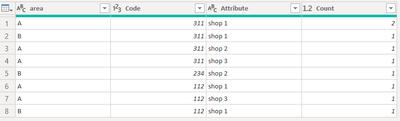
FYI that, if you don't want to group the rows to create the count column, you can delete that step in the query and generate same result with a simple measure (in case you need to do other analyses).
Pat
Thank you for your help Pat
Here's one way to do it in the query editor. To see how it works, just create a blank query, open the Advanced Editor and replace the text there with the M code below.
let
Source = Table.FromRows(Json.Document(Binary.Decompress(Binary.FromText("i45WclTSUTI2NASSIKwAxrE60UpOOMRR1UMwTL2RsQlUrSGKekNDIyRzEOpRxYHqYwE=", BinaryEncoding.Base64), Compression.Deflate)), let _t = ((type nullable text) meta [Serialized.Text = true]) in type table [area = _t, #"Code " = _t, #"shop 1" = _t, #"shop 2" = _t, #"shop 3" = _t]),
#"Changed Type" = Table.TransformColumnTypes(Source,{{"area", type text}, {"Code ", Int64.Type}, {"shop 1", Int64.Type}, {"shop 2", Int64.Type}, {"shop 3", Int64.Type}}),
#"Unpivoted Other Columns" = Table.UnpivotOtherColumns(#"Changed Type", {"area", "Code "}, "Attribute", "Value"),
#"Grouped Rows" = Table.Group(#"Unpivoted Other Columns", {"area", "Code ", "Attribute"}, {{"Count", each List.Sum([Value]), type number}})
in
#"Grouped Rows"
FYI that, if you don't want to group the rows to create the count column, you can delete that step in the query and generate same result with a simple measure (in case you need to do other analyses).
Pat
Check out the April 2026 Power BI update to learn about new features.
Sign up to receive a private message when registration opens and key events begin.
If you have recently started exploring Fabric, we'd love to hear how it's going. Your feedback can help with product improvements.
| User | Count |
|---|---|
| 28 | |
| 23 | |
| 22 | |
| 16 | |
| 16 |
| User | Count |
|---|---|
| 61 | |
| 35 | |
| 28 | |
| 22 | |
| 22 |