This time we’re going bigger than ever. Fabric, Power BI, SQL, AI and more. We're covering it all. You won't want to miss it.
Learn moreLevel up your Power BI skills this month - build one visual each week and tell better stories with data! Get started
Hi guys,
I have a big problem with finding a solution. We want to reduce the number of shipments to <= 2 per month, per part number. I want to count rows where it was 3rd or more shipment of a specific part number in a specific month. in the example below rows 3 and 6 should be counted. I can't use RANKX because it's DirectQuery. I tried to create calculated grouped table but in table I have dates and I couldn't use YearMonth column from calendar table (related). Do you have any ideas?
| Row | Supplier | Part Number | Date | Tracking Number |
| 1 | 0010 | A | 6/10/22 | 01 |
| 2 | 0010 | A | 6/11/22 | 02 |
| 3 | 0010 | A | 6/12/22 | 03 |
| 4 | 0020 | B | 6/13/22 | 04 |
| 5 | 0020 | B | 6/14/22 | 05 |
| 6 | 0030 | B | 6/15/22 | 06 |
Solved! Go to Solution.
Hi @Anonymous ,
Please try this code to create a measure.
Count =
VAR _ADD =
ADDCOLUMNS (
ALL ( 'Table' ),
"YearMonth",
YEAR ( 'Table'[Date] ) * 100
+ MONTH ( 'Table'[Date] )
)
VAR _ADD1 =
ADDCOLUMNS (
_ADD,
"Flag",
RANKX (
FILTER (
_ADD,
[Part Number] = EARLIER ( [Part Number] )
&& [YearMonth] = EARLIER ( [YearMonth] )
),
[Date],
,
ASC,
DENSE
)
)
RETURN
COUNTAX (
FILTER ( _ADD1, [Part Number] = MAX ( 'Table'[Part Number] ) && [Flag] > 2 ),
[Flag]
)
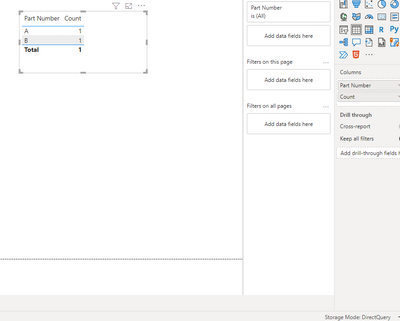
Result is as below.
Best Regards,
Rico Zhou
If this post helps, then please consider Accept it as the solution to help the other members find it more quickly.
Hi @Anonymous ,
Please try this code to create a measure.
Count =
VAR _ADD =
ADDCOLUMNS (
ALL ( 'Table' ),
"YearMonth",
YEAR ( 'Table'[Date] ) * 100
+ MONTH ( 'Table'[Date] )
)
VAR _ADD1 =
ADDCOLUMNS (
_ADD,
"Flag",
RANKX (
FILTER (
_ADD,
[Part Number] = EARLIER ( [Part Number] )
&& [YearMonth] = EARLIER ( [YearMonth] )
),
[Date],
,
ASC,
DENSE
)
)
RETURN
COUNTAX (
FILTER ( _ADD1, [Part Number] = MAX ( 'Table'[Part Number] ) && [Flag] > 2 ),
[Flag]
)
Result is as below.
Best Regards,
Rico Zhou
If this post helps, then please consider Accept it as the solution to help the other members find it more quickly.
It works. Thank you.
EDIT. I want to count excesive shipments in total (without splitting to part numbers) and this need to work with Supplier slicer.
Check out the April 2026 Power BI update to learn about new features.
Sign up to receive a private message when registration opens and key events begin.
If you have recently started exploring Fabric, we'd love to hear how it's going. Your feedback can help with product improvements.
| User | Count |
|---|---|
| 36 | |
| 33 | |
| 31 | |
| 24 | |
| 18 |
| User | Count |
|---|---|
| 68 | |
| 50 | |
| 33 | |
| 24 | |
| 24 |