Share feedback directly with Fabric product managers, participate in targeted research studies and influence the Fabric roadmap.
Sign up nowGet Fabric certified for FREE! Don't miss your chance! Learn more
Hi guys,
I have a big problem with finding a solution. We want to reduce the number of shipments to <= 2 per month, per part number. I want to count rows where it was 3rd or more shipment of a specific part number in a specific month. in the example below rows 3 and 6 should be counted. I can't use RANKX because it's DirectQuery. I tried to create calculated grouped table but in table I have dates and I couldn't use YearMonth column from calendar table (related). Do you have any ideas?
| Row | Supplier | Part Number | Date | Tracking Number |
| 1 | 0010 | A | 6/10/22 | 01 |
| 2 | 0010 | A | 6/11/22 | 02 |
| 3 | 0010 | A | 6/12/22 | 03 |
| 4 | 0020 | B | 6/13/22 | 04 |
| 5 | 0020 | B | 6/14/22 | 05 |
| 6 | 0030 | B | 6/15/22 | 06 |
Solved! Go to Solution.
Hi @Anonymous ,
Please try this code to create a measure.
Count =
VAR _ADD =
ADDCOLUMNS (
ALL ( 'Table' ),
"YearMonth",
YEAR ( 'Table'[Date] ) * 100
+ MONTH ( 'Table'[Date] )
)
VAR _ADD1 =
ADDCOLUMNS (
_ADD,
"Flag",
RANKX (
FILTER (
_ADD,
[Part Number] = EARLIER ( [Part Number] )
&& [YearMonth] = EARLIER ( [YearMonth] )
),
[Date],
,
ASC,
DENSE
)
)
RETURN
COUNTAX (
FILTER ( _ADD1, [Part Number] = MAX ( 'Table'[Part Number] ) && [Flag] > 2 ),
[Flag]
)
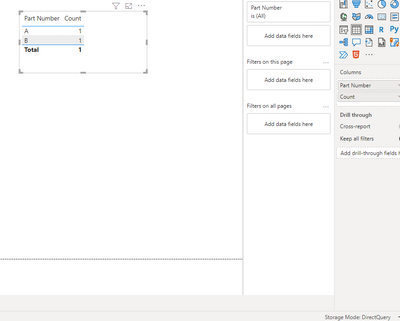
Result is as below.
Best Regards,
Rico Zhou
If this post helps, then please consider Accept it as the solution to help the other members find it more quickly.
Hi @Anonymous ,
Please try this code to create a measure.
Count =
VAR _ADD =
ADDCOLUMNS (
ALL ( 'Table' ),
"YearMonth",
YEAR ( 'Table'[Date] ) * 100
+ MONTH ( 'Table'[Date] )
)
VAR _ADD1 =
ADDCOLUMNS (
_ADD,
"Flag",
RANKX (
FILTER (
_ADD,
[Part Number] = EARLIER ( [Part Number] )
&& [YearMonth] = EARLIER ( [YearMonth] )
),
[Date],
,
ASC,
DENSE
)
)
RETURN
COUNTAX (
FILTER ( _ADD1, [Part Number] = MAX ( 'Table'[Part Number] ) && [Flag] > 2 ),
[Flag]
)
Result is as below.
Best Regards,
Rico Zhou
If this post helps, then please consider Accept it as the solution to help the other members find it more quickly.
It works. Thank you.
EDIT. I want to count excesive shipments in total (without splitting to part numbers) and this need to work with Supplier slicer.
If you love stickers, then you will definitely want to check out our Community Sticker Challenge!
Check out the January 2026 Power BI update to learn about new features.
| User | Count |
|---|---|
| 65 | |
| 64 | |
| 49 | |
| 21 | |
| 18 |
| User | Count |
|---|---|
| 119 | |
| 117 | |
| 38 | |
| 36 | |
| 29 |