cancel
Showing results for 
Search instead for 
Did you mean: 

July 7 - July 17 | Round 2 of the Power BI Dataviz World Championships. Don't miss your chance! Learn more

Reply
Anonymous
Not applicable

Filtering rows by aggregation

Hi guys,


I have a big problem with finding a solution. We want to reduce the number of shipments to <= 2 per month, per part number. I want to count rows where it was 3rd or more shipment of a specific part number in a specific month. in the example below rows 3 and 6 should be counted. I can't use RANKX because it's DirectQuery.  I tried to create calculated grouped table but in table I have dates and I couldn't use YearMonth column from calendar table (related). Do you have any ideas? 


RowSupplierPart NumberDateTracking Number
10010A6/10/2201
20010A6/11/2202
30010A6/12/2203
40020B6/13/2204
50020B6/14/2205
60030B6/15/2206
1 ACCEPTED SOLUTION
Anonymous
Not applicable

Hi @Anonymous ,


Please try this code to create a measure.

Count =
VAR _ADD =
    ADDCOLUMNS (
        ALL ( 'Table' ),
        "YearMonth",
            YEAR ( 'Table'[Date] ) * 100
                + MONTH ( 'Table'[Date] )
    )
VAR _ADD1 =
    ADDCOLUMNS (
        _ADD,
        "Flag",
            RANKX (
                FILTER (
                    _ADD,
                    [Part Number] = EARLIER ( [Part Number] )
                        && [YearMonth] = EARLIER ( [YearMonth] )
                ),
                [Date],
                ,
                ASC,
                DENSE
            )
    )
RETURN
    COUNTAX (
        FILTER ( _ADD1, [Part Number] = MAX ( 'Table'[Part Number] ) && [Flag] > 2 ),
        [Flag]
    )

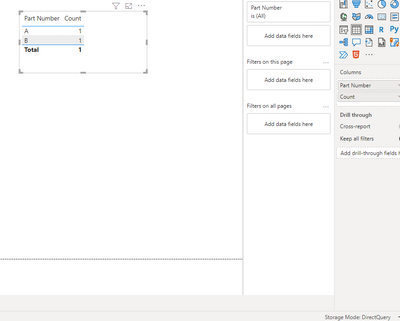
 Result is as below.

RicoZhou_0-1671004796578.png


Best Regards,
Rico Zhou


If this post helps, then please consider Accept it as the solution to help the other members find it more quickly.


View solution in original post

3 REPLIES 3
Anonymous
Not applicable

Hi @Anonymous ,


Please try this code to create a measure.

Count =
VAR _ADD =
    ADDCOLUMNS (
        ALL ( 'Table' ),
        "YearMonth",
            YEAR ( 'Table'[Date] ) * 100
                + MONTH ( 'Table'[Date] )
    )
VAR _ADD1 =
    ADDCOLUMNS (
        _ADD,
        "Flag",
            RANKX (
                FILTER (
                    _ADD,
                    [Part Number] = EARLIER ( [Part Number] )
                        && [YearMonth] = EARLIER ( [YearMonth] )
                ),
                [Date],
                ,
                ASC,
                DENSE
            )
    )
RETURN
    COUNTAX (
        FILTER ( _ADD1, [Part Number] = MAX ( 'Table'[Part Number] ) && [Flag] > 2 ),
        [Flag]
    )

 Result is as below.

RicoZhou_0-1671004796578.png


Best Regards,
Rico Zhou


If this post helps, then please consider Accept it as the solution to help the other members find it more quickly.


Anonymous
Not applicable

It works. Thank you.

Anonymous
Not applicable

EDIT. I want to count excesive shipments in total (without splitting to part numbers) and this need to work with Supplier slicer. 

Helpful resources

Announcements
FabCon and SQLCon Barcelona 2026

FabCon & SQLCon – Barcelona 2026

Join us in Barcelona for FabCon and SQLCon, the Fabric, Power BI, SQL, and AI community event. Save €200 with code FABCMTY200.

60 days of Data Days Carousel

Data Days 2026

Join Fabric Data Days 2026: 60 days of free live/on-demand sessions, challenges, study groups, and certification opportunities.

Power BI DataViz World Championships carousel

Power BI DataViz World Championships - June 2026

A new Power BI DataViz World Championship is coming this June! Don't miss out on submitting your entry.