Join us at FabCon Atlanta from March 16 - 20, 2026, for the ultimate Fabric, Power BI, AI and SQL community-led event. Save $200 with code FABCOMM.
Register now!The Power BI Data Visualization World Championships is back! Get ahead of the game and start preparing now! Learn more
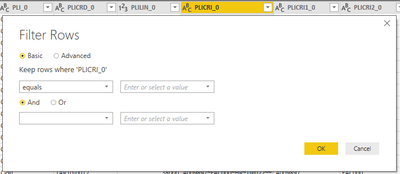
I can't filter rows by parameters like the tutorials (here an example) in October 2018 version (2.63.3272.40461).
Why there's no more the filter type?
How can I do the same without this feature?
Solved! Go to Solution.
@Anonymous Hmm Strange !! I've Oct 2018 update but I can't see any issues in using the parameter as filter.
But it is worth checking below:
Proud to be a PBI Community Champion
@PattemManoharI'm using the Power Query Editor and this is what I see in the Filter Rows panel.
I'm not the only one in my office with this issue, but one of my colleagues can do it with a previous version of Power BI Desktop (July 2018).
@Anonymous Hmm Strange !! I've Oct 2018 update but I can't see any issues in using the parameter as filter.
But it is worth checking below:
Proud to be a PBI Community Champion
Reading the tutorials I just took for granted that it was a standard feature and not an option. Thank you, now it's working!
The Power BI Data Visualization World Championships is back! Get ahead of the game and start preparing now!
| User | Count |
|---|---|
| 61 | |
| 46 | |
| 40 | |
| 38 | |
| 22 |
| User | Count |
|---|---|
| 176 | |
| 131 | |
| 118 | |
| 82 | |
| 54 |