This time we’re going bigger than ever. Fabric, Power BI, SQL, AI and more. We're covering it all. You won't want to miss it.
Learn moreDid you hear? There's a new SQL AI Developer certification (DP-800). Start preparing now and be one of the first to get certified. Register now
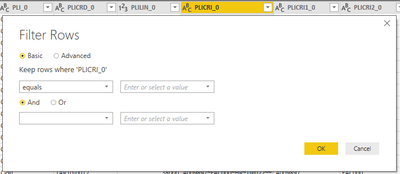
I can't filter rows by parameters like the tutorials (here an example) in October 2018 version (2.63.3272.40461).
Why there's no more the filter type?
How can I do the same without this feature?
Solved! Go to Solution.
@Anonymous Hmm Strange !! I've Oct 2018 update but I can't see any issues in using the parameter as filter.
But it is worth checking below:
Proud to be a PBI Community Champion
@PattemManoharI'm using the Power Query Editor and this is what I see in the Filter Rows panel.
I'm not the only one in my office with this issue, but one of my colleagues can do it with a previous version of Power BI Desktop (July 2018).
@Anonymous Hmm Strange !! I've Oct 2018 update but I can't see any issues in using the parameter as filter.
But it is worth checking below:
Proud to be a PBI Community Champion
Reading the tutorials I just took for granted that it was a standard feature and not an option. Thank you, now it's working!
Check out the April 2026 Power BI update to learn about new features.
If you have recently started exploring Fabric, we'd love to hear how it's going. Your feedback can help with product improvements.
| User | Count |
|---|---|
| 36 | |
| 32 | |
| 31 | |
| 21 | |
| 15 |
| User | Count |
|---|---|
| 68 | |
| 57 | |
| 31 | |
| 29 | |
| 22 |