cancel
Showing results for 
Search instead for 
Did you mean: 

Vote for your favorite vizzies from the Power BI Dataviz World Championship submissions. Vote now!

Reply
Anonymous
Not applicable

Filter rows by parameter

I can't filter rows by parameters like the tutorials (here an example) in October 2018 version (2.63.3272.40461).

Why there's no more the filter type?


image-6


How can I do the same without this feature?

1 ACCEPTED SOLUTION

@Anonymous Hmm Strange !! I've Oct 2018 update but I can't see any issues in using the parameter as filter.


But it is worth checking below:


image.png


Did I answer your question? Mark my post as a solution!

Proud to be a PBI Community Champion


View solution in original post

4 REPLIES 4
PattemManohar
Community Champion
Community Champion

@Anonymous You should able to do that. Please make sure you are trying this in "Power Query Editor"


Did I answer your question? Mark my post as a solution!

Proud to be a PBI Community Champion


Anonymous
Not applicable

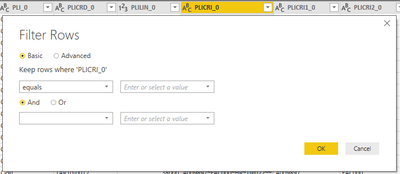
@PattemManoharI'm using the Power Query Editor and this is what I see in the Filter Rows panel.


immagine.png


I'm not the only one in my office with this issue, but one of my colleagues can do it with a previous version of Power BI Desktop (July 2018).

@Anonymous Hmm Strange !! I've Oct 2018 update but I can't see any issues in using the parameter as filter.


But it is worth checking below:


image.png


Did I answer your question? Mark my post as a solution!

Proud to be a PBI Community Champion


Anonymous
Not applicable

Reading the tutorials I just took for granted that it was a standard feature and not an option. Thank you, now it's working!

Helpful resources

Announcements
Power BI DataViz World Championships

Power BI Dataviz World Championships

Vote for your favorite vizzies from the Power BI World Championship submissions!

Sticker Challenge 2026 Carousel

Join our Community Sticker Challenge 2026

If you love stickers, then you will definitely want to check out our Community Sticker Challenge!

January Power BI Update Carousel

Power BI Monthly Update - January 2026

Check out the January 2026 Power BI update to learn about new features.

FabCon Atlanta 2026 carousel

FabCon Atlanta 2026

Join us at FabCon Atlanta, March 16-20, for the ultimate Fabric, Power BI, AI and SQL community-led event. Save $200 with code FABCOMM.