This time we’re going bigger than ever. Fabric, Power BI, SQL, AI and more. We're covering it all. You won't want to miss it.
Learn moreLevel up your Power BI skills this month - build one visual each week and tell better stories with data! Get started
Hi all,
Does anybody know a syntax for the advanced editor to filter data only for a certain years. Currently, the coming data from one query is from 2012 till 2020 and I would like to pull only information from 2018 until 2020. The current syntax is something like:
let
Source = 1Database("aa", "cbb", [TypedMeasureColumns=true]),
MAR1 = Source{[Id="MAR"]}[Data],
MAR2 = MAR1{[Id="MAR"]}[Data],
#"Added Items" = Cube.Transform(MAR2, {{Cube.AddAndExpandDimensionColumn, "[A]", {Cube.AddAndExpandDimensionColumn, "[C]", {Cube.AddMeasureColumn, "F"}})
in
#"Added Items"
Thank you.
Solved! Go to Solution.
Hi @Anonymous ,
You could filter date directly like below:
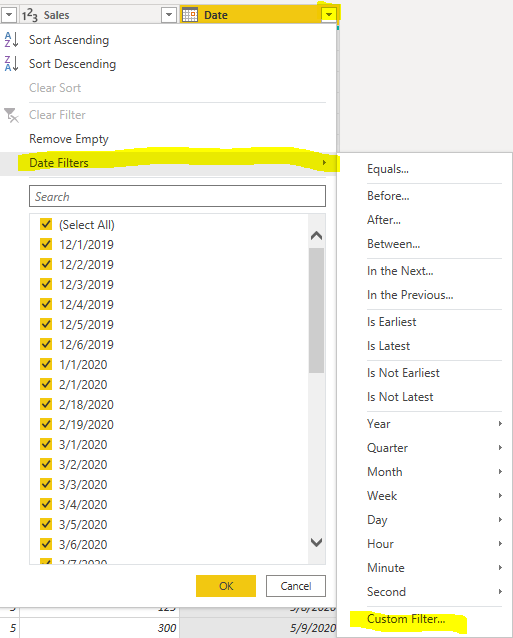
Or you could create a parameter to filter it. When you want to set other date range, you could only change the parameters.
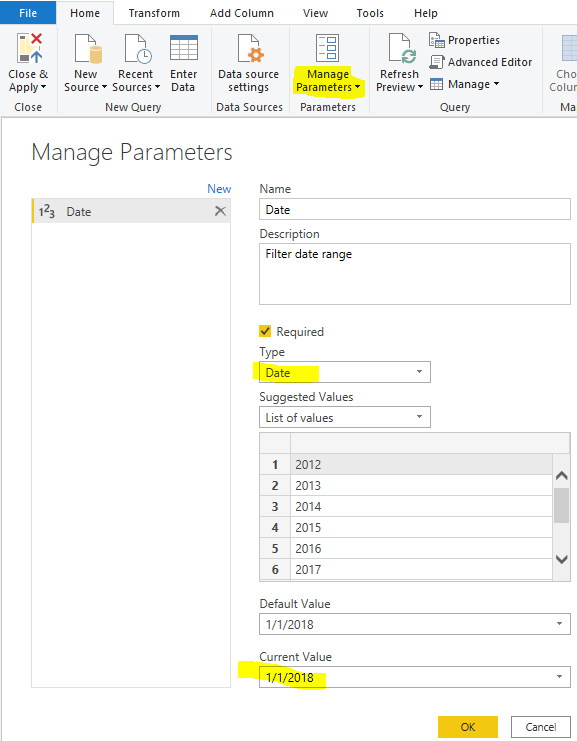
let
Source = Excel.Workbook(File.Contents("C:\Users\xueding\Desktop\Financial Sample - Copy.xlsx"), null, true),
financials3_Table = Source{[Item="financials3",Kind="Table"]}[Data],
#"Changed Type" = Table.TransformColumnTypes(financials3_Table,{{"Segment", type text}, {"Country", type text}, {"Product", type text}, {"Units Sold", type number}, {"Manufacturing Price", Int64.Type}, {"Sales", Int64.Type}, {"Date", type date}}),
#"Filtered Rows" = Table.SelectRows(#"Changed Type", each [Date] > Date)
in
#"Filtered Rows"
HI @Anonymous ,
You can refer this video.
https://www.youtube.com/watch?v=qdhsq23cQhg
Regards,
Harsh Nathani
Appreciate with a Kudos!! (Click the Thumbs Up Button)
Did I answer your question? Mark my post as a solution!
Hi @harshnathani,
Thank you for the video. I watched it and this option didn't work for my case, but I will try something similar or try to add
Hi @Anonymous ,
You could filter date directly like below:
Or you could create a parameter to filter it. When you want to set other date range, you could only change the parameters.
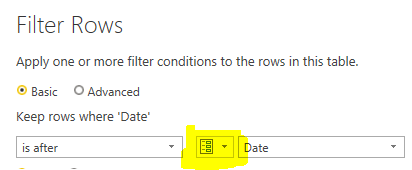
let
Source = Excel.Workbook(File.Contents("C:\Users\xueding\Desktop\Financial Sample - Copy.xlsx"), null, true),
financials3_Table = Source{[Item="financials3",Kind="Table"]}[Data],
#"Changed Type" = Table.TransformColumnTypes(financials3_Table,{{"Segment", type text}, {"Country", type text}, {"Product", type text}, {"Units Sold", type number}, {"Manufacturing Price", Int64.Type}, {"Sales", Int64.Type}, {"Date", type date}}),
#"Filtered Rows" = Table.SelectRows(#"Changed Type", each [Date] > Date)
in
#"Filtered Rows"
Check out the April 2026 Power BI update to learn about new features.
Sign up to receive a private message when registration opens and key events begin.
If you have recently started exploring Fabric, we'd love to hear how it's going. Your feedback can help with product improvements.
| User | Count |
|---|---|
| 36 | |
| 29 | |
| 29 | |
| 21 | |
| 18 |
| User | Count |
|---|---|
| 68 | |
| 39 | |
| 33 | |
| 24 | |
| 23 |