This is best Fabric, Power BI, SQL and AI community event. How do we know? The last event sold out! Save €200 with code FABCMTY200.
Register nowA new Data Days event is coming soon! This time we’re going bigger than ever. Fabric, Power BI, SQL, AI and more. Don't miss out.
Hi all,
Does anybody know a syntax for the advanced editor to filter data only for a certain years. Currently, the coming data from one query is from 2012 till 2020 and I would like to pull only information from 2018 until 2020. The current syntax is something like:
let
Source = 1Database("aa", "cbb", [TypedMeasureColumns=true]),
MAR1 = Source{[Id="MAR"]}[Data],
MAR2 = MAR1{[Id="MAR"]}[Data],
#"Added Items" = Cube.Transform(MAR2, {{Cube.AddAndExpandDimensionColumn, "[A]", {Cube.AddAndExpandDimensionColumn, "[C]", {Cube.AddMeasureColumn, "F"}})
in
#"Added Items"
Thank you.
Solved! Go to Solution.
Hi @Anonymous ,
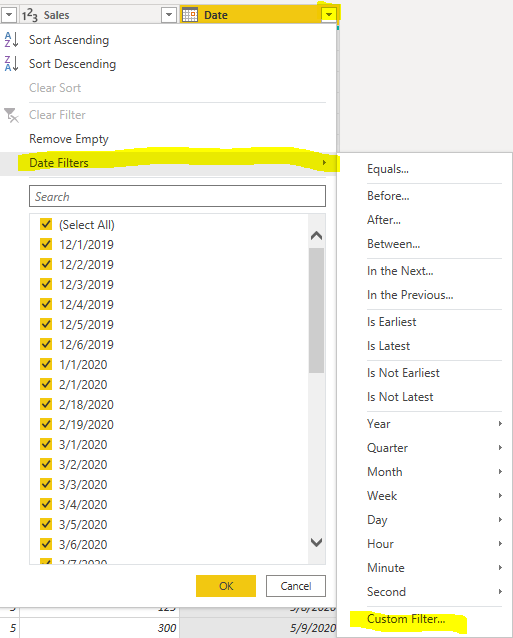
You could filter date directly like below:
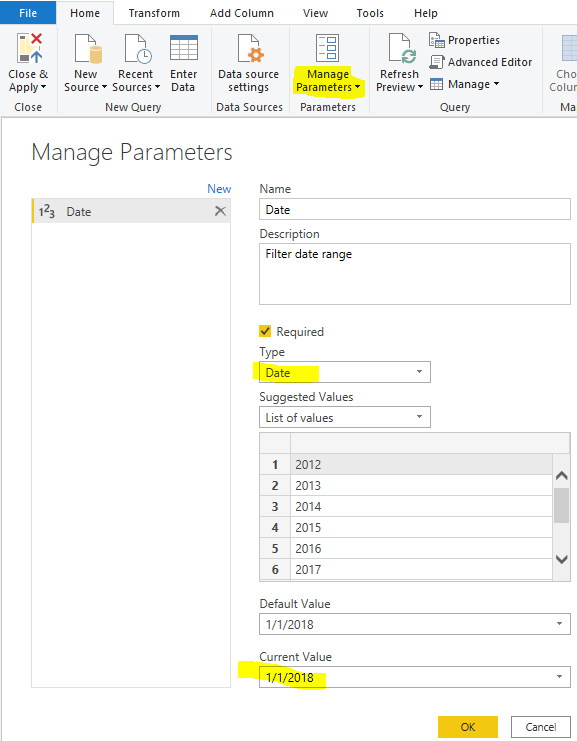
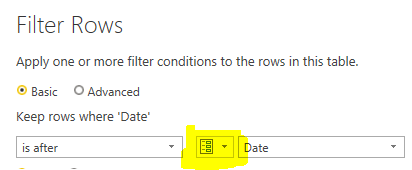
Or you could create a parameter to filter it. When you want to set other date range, you could only change the parameters.
let
Source = Excel.Workbook(File.Contents("C:\Users\xueding\Desktop\Financial Sample - Copy.xlsx"), null, true),
financials3_Table = Source{[Item="financials3",Kind="Table"]}[Data],
#"Changed Type" = Table.TransformColumnTypes(financials3_Table,{{"Segment", type text}, {"Country", type text}, {"Product", type text}, {"Units Sold", type number}, {"Manufacturing Price", Int64.Type}, {"Sales", Int64.Type}, {"Date", type date}}),
#"Filtered Rows" = Table.SelectRows(#"Changed Type", each [Date] > Date)
in
#"Filtered Rows"
HI @Anonymous ,
You can refer this video.
https://www.youtube.com/watch?v=qdhsq23cQhg
Regards,
Harsh Nathani
Appreciate with a Kudos!! (Click the Thumbs Up Button)
Did I answer your question? Mark my post as a solution!
Hi @harshnathani,
Thank you for the video. I watched it and this option didn't work for my case, but I will try something similar or try to add
Hi @Anonymous ,
You could filter date directly like below:
Or you could create a parameter to filter it. When you want to set other date range, you could only change the parameters.
let
Source = Excel.Workbook(File.Contents("C:\Users\xueding\Desktop\Financial Sample - Copy.xlsx"), null, true),
financials3_Table = Source{[Item="financials3",Kind="Table"]}[Data],
#"Changed Type" = Table.TransformColumnTypes(financials3_Table,{{"Segment", type text}, {"Country", type text}, {"Product", type text}, {"Units Sold", type number}, {"Manufacturing Price", Int64.Type}, {"Sales", Int64.Type}, {"Date", type date}}),
#"Filtered Rows" = Table.SelectRows(#"Changed Type", each [Date] > Date)
in
#"Filtered Rows"
Check out the May 2026 Power BI update to learn about new features.
Sign up to receive a private message when registration opens and key events begin.
If you have recently started exploring Fabric, we'd love to hear how it's going. Your feedback can help with product improvements.
| User | Count |
|---|---|
| 29 | |
| 25 | |
| 24 | |
| 21 | |
| 14 |
| User | Count |
|---|---|
| 61 | |
| 48 | |
| 26 | |
| 21 | |
| 20 |