cancel
Showing results for 
Search instead for 
Did you mean: 

July 7 - July 17 | Round 2 of the Power BI Dataviz World Championships. Don't miss your chance! Learn more

Reply
Anonymous
Not applicable

Filter data in Advanced Editor

Hi all,

Does anybody know a syntax for the advanced editor to filter data only for a certain years. Currently, the coming data from one query is from 2012 till 2020 and I would like to pull only information from 2018 until 2020. The current syntax is something like:

let
Source = 1Database("aa", "cbb", [TypedMeasureColumns=true]),
MAR1 = Source{[Id="MAR"]}[Data],
MAR2 = MAR1{[Id="MAR"]}[Data],
#"Added Items" = Cube.Transform(MAR2, {{Cube.AddAndExpandDimensionColumn, "[A]", {Cube.AddAndExpandDimensionColumn, "[C]", {Cube.AddMeasureColumn, "F"}})
in
#"Added Items"

Thank you.

1 ACCEPTED SOLUTION

Hi @Anonymous ,


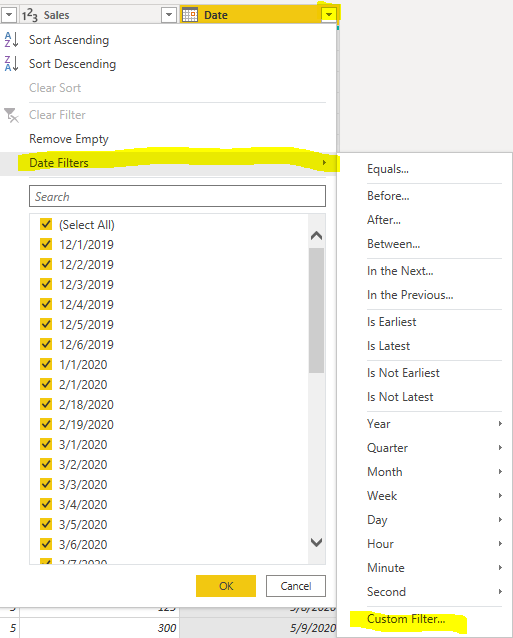
You could filter date directly like below: 

7.PNG


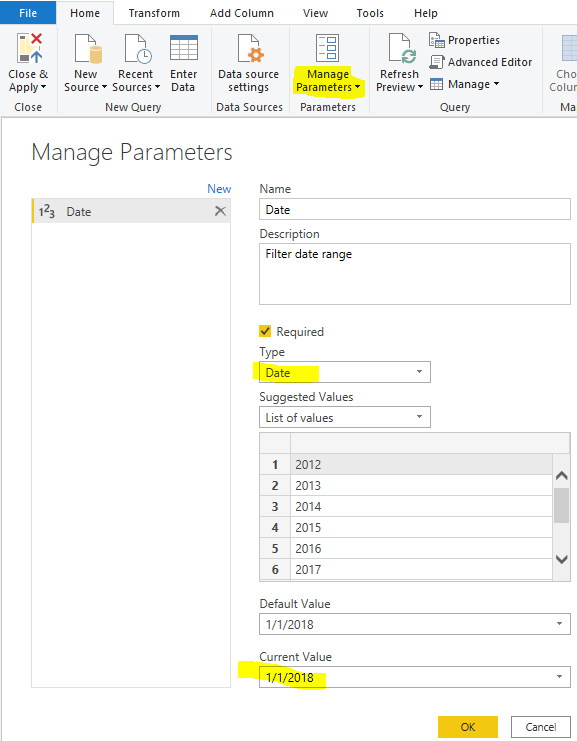
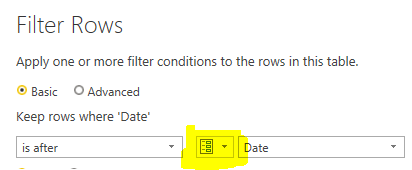
Or you could create a parameter to filter it. When you want to set other date range, you could only change the parameters.


1.PNG2.PNG

let
    Source = Excel.Workbook(File.Contents("C:\Users\xueding\Desktop\Financial Sample - Copy.xlsx"), null, true),
    financials3_Table = Source{[Item="financials3",Kind="Table"]}[Data],
    #"Changed Type" = Table.TransformColumnTypes(financials3_Table,{{"Segment", type text}, {"Country", type text}, {"Product", type text}, {"Units Sold", type number}, {"Manufacturing Price", Int64.Type}, {"Sales", Int64.Type}, {"Date", type date}}),
    #"Filtered Rows" = Table.SelectRows(#"Changed Type", each [Date] > Date)
in
    #"Filtered Rows"

Using Parameters in Power BI 


Best Regards,
Xue Ding
If this post helps, then please consider Accept it as the solution to help the other members find it more quickly.

View solution in original post

4 REPLIES 4
harshnathani
Community Champion
Community Champion

HI @Anonymous ,


You can refer this video.


https://www.youtube.com/watch?v=qdhsq23cQhg


Regards,

Harsh Nathani

Appreciate with a Kudos!! (Click the Thumbs Up Button)

Did I answer your question? Mark my post as a solution!


Anonymous
Not applicable

Hi @harshnathani,

Thank you for the video. I watched it and this option didn't work for my case, but I will try something similar or try to add 

Table.SelectRows function.

Best,

Hi @Anonymous ,


You could filter date directly like below: 

7.PNG


Or you could create a parameter to filter it. When you want to set other date range, you could only change the parameters.


1.PNG2.PNG

let
    Source = Excel.Workbook(File.Contents("C:\Users\xueding\Desktop\Financial Sample - Copy.xlsx"), null, true),
    financials3_Table = Source{[Item="financials3",Kind="Table"]}[Data],
    #"Changed Type" = Table.TransformColumnTypes(financials3_Table,{{"Segment", type text}, {"Country", type text}, {"Product", type text}, {"Units Sold", type number}, {"Manufacturing Price", Int64.Type}, {"Sales", Int64.Type}, {"Date", type date}}),
    #"Filtered Rows" = Table.SelectRows(#"Changed Type", each [Date] > Date)
in
    #"Filtered Rows"

Using Parameters in Power BI 


Best Regards,
Xue Ding
If this post helps, then please consider Accept it as the solution to help the other members find it more quickly.
Anonymous
Not applicable

Hi @v-xuding-msft ,

Thank you a lot. This way worked!

Best,
E.

Helpful resources

Announcements
FabCon and SQLCon Barcelona 2026

FabCon & SQLCon – Barcelona 2026

Join us in Barcelona for FabCon and SQLCon, the Fabric, Power BI, SQL, and AI community event. Save €200 with code FABCMTY200.

60 days of Data Days Carousel

Data Days 2026

Join Fabric Data Days 2026: 60 days of free live/on-demand sessions, challenges, study groups, and certification opportunities.

Power BI DataViz World Championships carousel

Power BI DataViz World Championships - June 2026

A new Power BI DataViz World Championship is coming this June! Don't miss out on submitting your entry.