Learn from the best! Meet the four finalists headed to the FINALS of the Power BI Dataviz World Championships! Register now
Hi I have a table. It has a date column. Now I want to filter the rows in such a way that I am left with only past 5 dates present in the table.
Suppose:
Date
12 Feb, 2017
11 June, 2017
9 May, 2017
31 May, 2017
24 March, 2017
19 Jan, 2017
26 April, 2017
Now my filtered table should display only past 5 dates and rest rows should be either hidden or removed from the table.
Like I want dates from 9 May, 2017 to 11 June, 2017 to be present and 19 Jan, 2017 and 12 Feb, 2017 to be removed.
Thanks
Solved! Go to Solution.
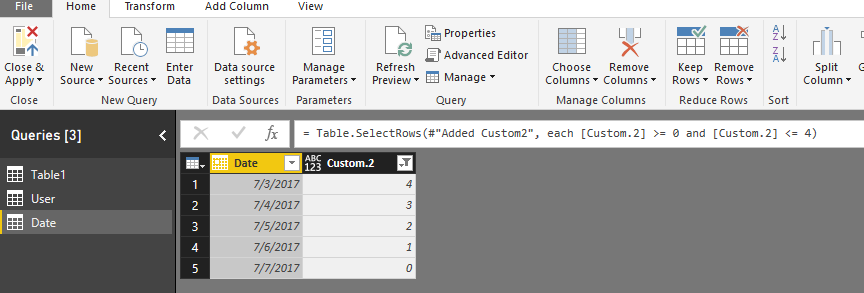
You can edit your query, add a custom column on it and filter the new column.
Add a custom column
= Table.AddColumn(#"Changed Type", "Custom.2", each Date.DayOfYear(DateTime.LocalNow())-Date.DayOfYear([Date]))
Filter this column
= Table.SelectRows(#"Added Custom2", each [Custom.2] >= 0 and [Custom.2] <= 4)
Regards,
Charlie Liao
You can edit your query, add a custom column on it and filter the new column.
Add a custom column
= Table.AddColumn(#"Changed Type", "Custom.2", each Date.DayOfYear(DateTime.LocalNow())-Date.DayOfYear([Date]))
Filter this column
= Table.SelectRows(#"Added Custom2", each [Custom.2] >= 0 and [Custom.2] <= 4)
Regards,
Charlie Liao
If you have recently started exploring Fabric, we'd love to hear how it's going. Your feedback can help with product improvements.
A new Power BI DataViz World Championship is coming this June! Don't miss out on submitting your entry.
Share feedback directly with Fabric product managers, participate in targeted research studies and influence the Fabric roadmap.
| User | Count |
|---|---|
| 57 | |
| 34 | |
| 33 | |
| 18 | |
| 16 |
| User | Count |
|---|---|
| 67 | |
| 65 | |
| 44 | |
| 30 | |
| 28 |