Join us at FabCon Atlanta from March 16 - 20, 2026, for the ultimate Fabric, Power BI, AI and SQL community-led event. Save $200 with code FABCOMM.
Register now!The Power BI Data Visualization World Championships is back! It's time to submit your entry. Live now!
Hi I have a table. It has a date column. Now I want to filter the rows in such a way that I am left with only past 5 dates present in the table.
Suppose:
Date
12 Feb, 2017
11 June, 2017
9 May, 2017
31 May, 2017
24 March, 2017
19 Jan, 2017
26 April, 2017
Now my filtered table should display only past 5 dates and rest rows should be either hidden or removed from the table.
Like I want dates from 9 May, 2017 to 11 June, 2017 to be present and 19 Jan, 2017 and 12 Feb, 2017 to be removed.
Thanks
Solved! Go to Solution.
You can edit your query, add a custom column on it and filter the new column.
Add a custom column
= Table.AddColumn(#"Changed Type", "Custom.2", each Date.DayOfYear(DateTime.LocalNow())-Date.DayOfYear([Date]))
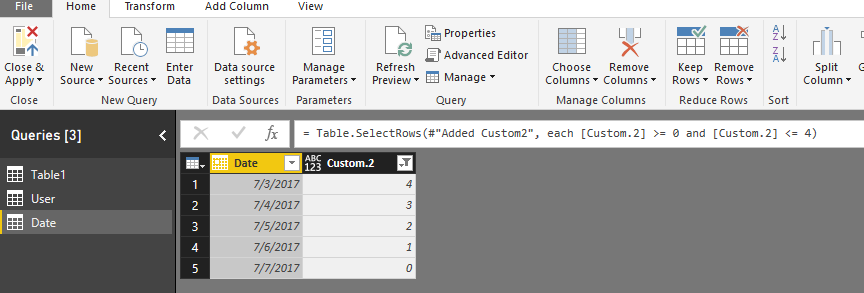
Filter this column
= Table.SelectRows(#"Added Custom2", each [Custom.2] >= 0 and [Custom.2] <= 4)
Regards,
Charlie Liao
You can edit your query, add a custom column on it and filter the new column.
Add a custom column
= Table.AddColumn(#"Changed Type", "Custom.2", each Date.DayOfYear(DateTime.LocalNow())-Date.DayOfYear([Date]))
Filter this column
= Table.SelectRows(#"Added Custom2", each [Custom.2] >= 0 and [Custom.2] <= 4)
Regards,
Charlie Liao
The Power BI Data Visualization World Championships is back! It's time to submit your entry.
Check out the January 2026 Power BI update to learn about new features.
| User | Count |
|---|---|
| 69 | |
| 45 | |
| 36 | |
| 28 | |
| 23 |
| User | Count |
|---|---|
| 141 | |
| 124 | |
| 59 | |
| 40 | |
| 32 |