Join us at FabCon Atlanta from March 16 - 20, 2026, for the ultimate Fabric, Power BI, AI and SQL community-led event. Save $200 with code FABCOMM.
Register now!Vote for your favorite vizzies from the Power BI Dataviz World Championship submissions. Vote now!
Hi I have a table. It has a date column. Now I want to filter the rows in such a way that I am left with only past 5 dates present in the table.
Suppose:
Date
12 Feb, 2017
11 June, 2017
9 May, 2017
31 May, 2017
24 March, 2017
19 Jan, 2017
26 April, 2017
Now my filtered table should display only past 5 dates and rest rows should be either hidden or removed from the table.
Like I want dates from 9 May, 2017 to 11 June, 2017 to be present and 19 Jan, 2017 and 12 Feb, 2017 to be removed.
Thanks
Solved! Go to Solution.
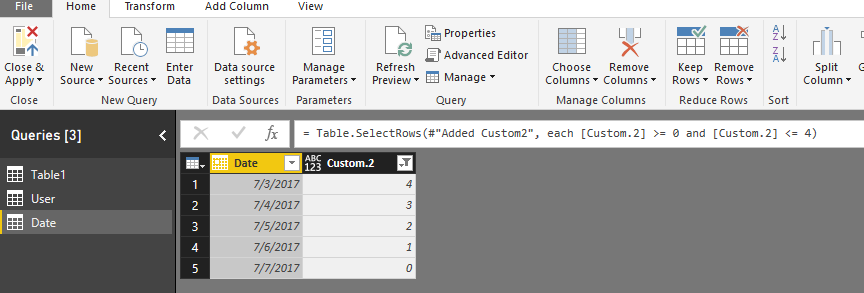
You can edit your query, add a custom column on it and filter the new column.
Add a custom column
= Table.AddColumn(#"Changed Type", "Custom.2", each Date.DayOfYear(DateTime.LocalNow())-Date.DayOfYear([Date]))
Filter this column
= Table.SelectRows(#"Added Custom2", each [Custom.2] >= 0 and [Custom.2] <= 4)
Regards,
Charlie Liao
You can edit your query, add a custom column on it and filter the new column.
Add a custom column
= Table.AddColumn(#"Changed Type", "Custom.2", each Date.DayOfYear(DateTime.LocalNow())-Date.DayOfYear([Date]))
Filter this column
= Table.SelectRows(#"Added Custom2", each [Custom.2] >= 0 and [Custom.2] <= 4)
Regards,
Charlie Liao
Vote for your favorite vizzies from the Power BI World Championship submissions!
If you love stickers, then you will definitely want to check out our Community Sticker Challenge!
Check out the January 2026 Power BI update to learn about new features.
| User | Count |
|---|---|
| 64 | |
| 51 | |
| 46 | |
| 23 | |
| 19 |
| User | Count |
|---|---|
| 139 | |
| 112 | |
| 51 | |
| 33 | |
| 29 |