We've captured the moments from FabCon & SQLCon that everyone is talking about, and we are bringing them to the community, live and on-demand. Starts on April 14th. Register now
I made a table in one of my reports, exported the data to an excel sheet and saved the report.
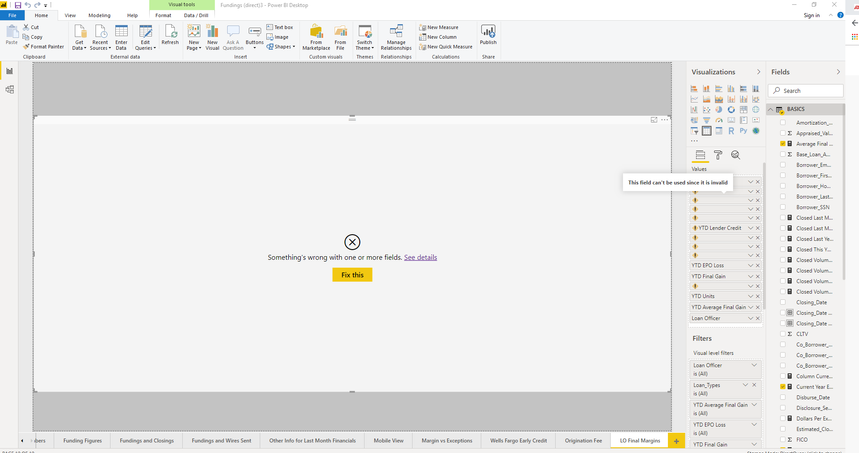
Later when I opened the report I was presented with the below screen. The measures that I had added in the previous session are gone. Their spot is still occupied in the table but the measures do not exist. Any way I can get them back?
Hi @kmatthews ,
One of your columns or measures has changed. Try removing the offending measure or column. If you don't know which one, take note of all the columns, and then remove them one by one until you see the table again. Then you can track down the offending issue.
Let me know if you have any questions.
If this solves your issues, please mark it as the solution, so that others can find it easily. Kudos are nice too.
Nathaniel
Proud to be a Super User!
If you have recently started exploring Fabric, we'd love to hear how it's going. Your feedback can help with product improvements.
A new Power BI DataViz World Championship is coming this June! Don't miss out on submitting your entry.
Share feedback directly with Fabric product managers, participate in targeted research studies and influence the Fabric roadmap.
| User | Count |
|---|---|
| 54 | |
| 37 | |
| 32 | |
| 17 | |
| 15 |
| User | Count |
|---|---|
| 64 | |
| 63 | |
| 37 | |
| 34 | |
| 22 |