cancel
Showing results for 
Search instead for 
Did you mean: 

The Power BI Data Visualization World Championships is back! Get ahead of the game and start preparing now! Learn more

Reply
kmatthews
Frequent Visitor

Fields Disappeared

I made a table in one of my reports, exported the data to an excel sheet and saved the report. 


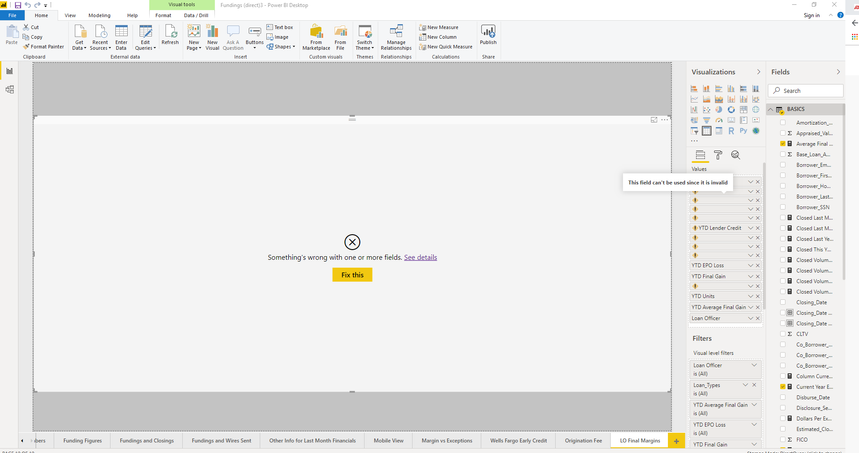
Later when I opened the report I was presented with the below screen. The measures that I had added in the previous session are gone. Their spot is still occupied in the table but the measures do not exist. Any way I can get them back?


kmatthews_0-1572382536365.png

1 REPLY 1
Nathaniel_C
Community Champion
Community Champion

Hi @kmatthews ,

One of your columns or measures has changed. Try removing the offending measure or column. If you don't know which one, take note of all the columns, and then remove them one by one until you see the table again.  Then you can track down the offending issue.
Let me know if you have any questions.

If this solves your issues, please mark it as the solution, so that others can find it easily. Kudos are nice too.
Nathaniel


Did I answer your question? Mark my post as a solution!

Proud to be a Super User!


Helpful resources

Announcements
Power BI DataViz World Championships

Power BI Dataviz World Championships

The Power BI Data Visualization World Championships is back! Get ahead of the game and start preparing now!

December 2025 Power BI Update Carousel

Power BI Monthly Update - December 2025

Check out the December 2025 Power BI Holiday Recap!

FabCon Atlanta 2026 carousel

FabCon Atlanta 2026

Join us at FabCon Atlanta, March 16-20, for the ultimate Fabric, Power BI, AI and SQL community-led event. Save $200 with code FABCOMM.