cancel
Showing results for 
Search instead for 
Did you mean: 

Learn from the best! Meet the four finalists headed to the FINALS of the Power BI Dataviz World Championships! Register now

Reply
Anonymous
Not applicable

Dynamic Dual Measure for Matrix Visual

Hello All,


Long time reader, first time questioner, as I can't figure this one out, even after scouring the site.  


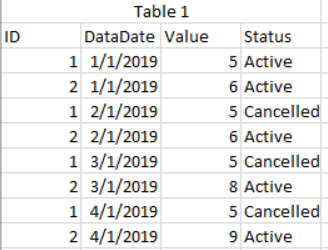
So, I have a table like so

soshaughnessy7_0-1572380796708.png

I want to create a visual that allows the user to choose a minimum and maximum datadate and then see what has changed between those 2 periods by ID.  


For example, if a user selected 1/1/2018 and 3/1/2018, the visual would then show the below

soshaughnessy7_1-1572380895103.png

Any help would be greatly appreciated.  I don't want to list out everything I've tried as I don't want to deter anyone.  I may have been going down the right path at one point and just missed a key component.  

1 ACCEPTED SOLUTION
Nathaniel_C
Community Champion
Community Champion

Hi @Anonymous ,

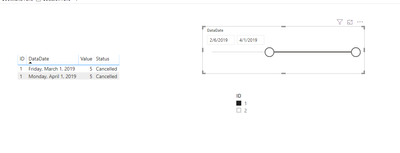
If I understand the issue, drop the table on a visual, select two slicers. selectdate.PNG

 Here is my PBIXSelect Date 
Let me know if you have any questions.

If this solves your issues, please mark it as the solution, so that others can find it easily. Kudos are nice too.
Nathaniel


Did I answer your question? Mark my post as a solution!

Proud to be a Super User!


View solution in original post

1 REPLY 1
Nathaniel_C
Community Champion
Community Champion

Hi @Anonymous ,

If I understand the issue, drop the table on a visual, select two slicers. selectdate.PNG

 Here is my PBIXSelect Date 
Let me know if you have any questions.

If this solves your issues, please mark it as the solution, so that others can find it easily. Kudos are nice too.
Nathaniel


Did I answer your question? Mark my post as a solution!

Proud to be a Super User!


Helpful resources

Announcements
Join our Fabric User Panel

Join our Fabric User Panel

Share feedback directly with Fabric product managers, participate in targeted research studies and influence the Fabric roadmap.

February Power BI Update Carousel

Power BI Monthly Update - February 2026

Check out the February 2026 Power BI update to learn about new features.

FabCon Atlanta 2026 carousel

FabCon Atlanta 2026

Join us at FabCon Atlanta, March 16-20, for the ultimate Fabric, Power BI, AI and SQL community-led event. Save $200 with code FABCOMM.