Get certified for free when you join Fabric Data Days 2026 and dive into Fabric, Power BI, SQL, AI, and other essential data skills.
Join nowJuly 7 - July 17 | Round 2 of the Power BI Dataviz World Championships. Don't miss your chance! Learn more
I created a visual ( matrix) in Power BI desktop. Source from Views in SQL.
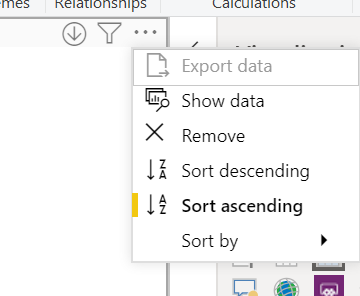
But I am not able to do export data in desktop or once published in the service.
Any suggestions on how to configurating this?
Solved! Go to Solution.
Hi @Anonymous ,
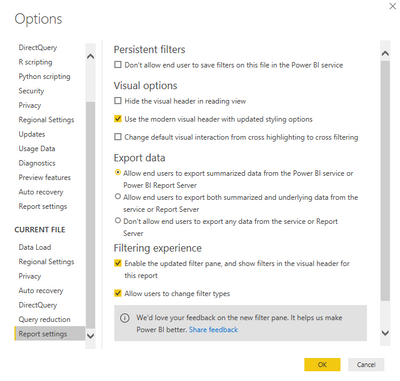
Check Power BI Desktop options.
Best Regards,
Jay
Community Support Team _ Jay Wang
If this post helps, then please consider Accept it as the solution to help the other members find it more quickly.
Hi @Anonymous ,
Check Power BI Desktop options.
Best Regards,
Jay
Community Support Team _ Jay Wang
If this post helps, then please consider Accept it as the solution to help the other members find it more quickly.
Hi @Anonymous,
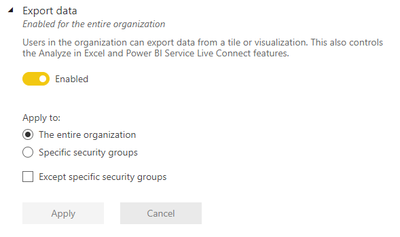
Have you confirmed with your administrators (...or yourself if you are the admin 😋) that the Export data setting in the admin portal is enabled, or you are part of an eligible group? It should look similar to this for visuals to allow exporting:
If not, then enabling this appropriately will allow export within about 15 minutes or so.
Regards,
Daniel
If my post solves your challenge, then please consider accepting as a solution to help other forum members find the answer more quickly 🙂
Proud to be a Super User!
On how to ask a technical question, if you really want an answer (courtesy of SQLBI)
Join us in Barcelona for FabCon and SQLCon, the Fabric, Power BI, SQL, and AI community event. Save €200 with code FABCMTY200.
Join Fabric Data Days 2026: 60 days of free live/on-demand sessions, challenges, study groups, and certification opportunities.
| User | Count |
|---|---|
| 22 | |
| 20 | |
| 14 | |
| 13 | |
| 13 |
| User | Count |
|---|---|
| 62 | |
| 40 | |
| 38 | |
| 38 | |
| 38 |