Get certified for free when you join Fabric Data Days 2026 and dive into Fabric, Power BI, SQL, AI, and other essential data skills.
Join nowJuly 28 - August 9 | Final Round of the Power BI Dataviz World Championships. This is your chance. Learn more
I created a visual ( matrix) in Power BI desktop. Source from Views in SQL.
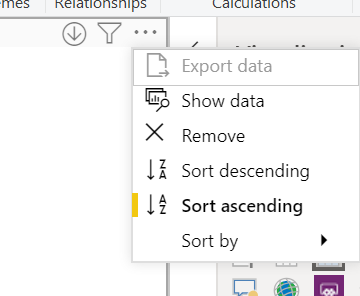
But I am not able to do export data in desktop or once published in the service.
Any suggestions on how to configurating this?
Solved! Go to Solution.
Hi @Anonymous ,
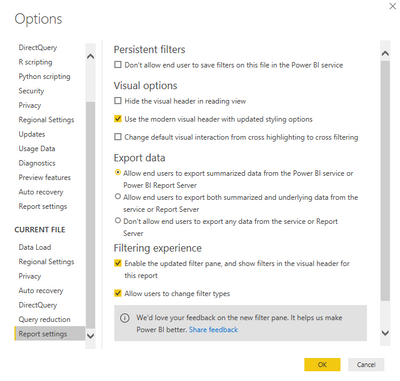
Check Power BI Desktop options.
Best Regards,
Jay
Community Support Team _ Jay Wang
If this post helps, then please consider Accept it as the solution to help the other members find it more quickly.
Hi @Anonymous ,
Check Power BI Desktop options.
Best Regards,
Jay
Community Support Team _ Jay Wang
If this post helps, then please consider Accept it as the solution to help the other members find it more quickly.
Hi @Anonymous,
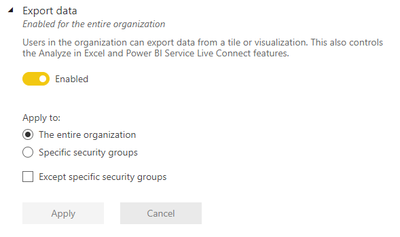
Have you confirmed with your administrators (...or yourself if you are the admin 😋) that the Export data setting in the admin portal is enabled, or you are part of an eligible group? It should look similar to this for visuals to allow exporting:
If not, then enabling this appropriately will allow export within about 15 minutes or so.
Regards,
Daniel
If my post solves your challenge, then please consider accepting as a solution to help other forum members find the answer more quickly 🙂
Proud to be a Super User!
On how to ask a technical question, if you really want an answer (courtesy of SQLBI)
If you love stickers, then you will definitely want to check out our community sticker challenge, Barcelona edition!
Check out the July 2026 Power BI update to learn about new features.
| User | Count |
|---|---|
| 26 | |
| 22 | |
| 22 | |
| 20 | |
| 18 |
| User | Count |
|---|---|
| 35 | |
| 28 | |
| 21 | |
| 19 | |
| 17 |