Get certified for free when you join Fabric Data Days 2026 and dive into Fabric, Power BI, SQL, AI, and other essential data skills.
Join nowJuly 7 - July 17 | Round 2 of the Power BI Dataviz World Championships. Don't miss your chance! Learn more
Hello dear forum users,
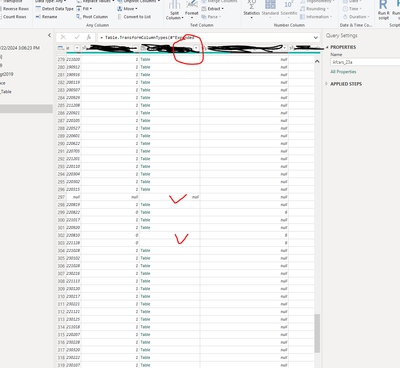
I have read in XML data into Power BI desktop. The XML data has three layers of nest tables (parent record>child>subchild). I can open and expand most of the nest tables. But a few of the tables have missing values (some rows don't have the table, either missing or blank). I can open and see the separate tables. But I cannot expand the table as separate fields., becauseI don't see the Expanding Table button behind the column name. Please see the screenshot of the Query table window below.
Is there anyway I can expand this table column? Your suggestions/advice is highly appreciated.
You can't expand something that's not there. Filter out the null values or replace them with fake (but expandable) tables.
Hi @lbendlin , thanks for your reply.
I don't think it is feasible to filter out the null values since these records have non-missing values in other fields. So I will need to replace them with fake tables of the same structure. I googled for some info on how to do this, but did not find anything useful. Would you please give me some specific instructions on how to fill in the fake tables?
Thanks a lot.
use #table and specify the same column names as in the "real" tables.
Join us in Barcelona for FabCon and SQLCon, the Fabric, Power BI, SQL, and AI community event. Save €200 with code FABCMTY200.
Join Data Days 2026: 60 days of free live/on-demand sessions, challenges, study groups, and certification opportunities.
| User | Count |
|---|---|
| 27 | |
| 23 | |
| 18 | |
| 18 | |
| 15 |
| User | Count |
|---|---|
| 53 | |
| 44 | |
| 42 | |
| 39 | |
| 34 |