This is best Fabric, Power BI, SQL and AI community event. How do we know? The last event sold out! Save €200 with code FABCMTY200.
Register nowA new Data Days event is coming soon! This time we’re going bigger than ever. Fabric, Power BI, SQL, AI and more. Don't miss out.
Hello dear forum users,
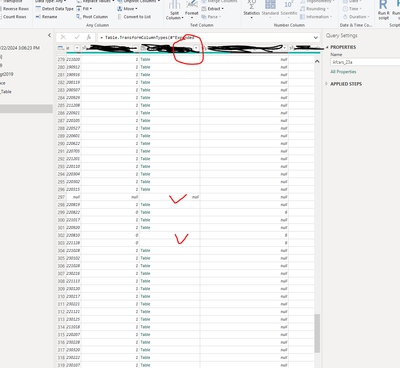
I have read in XML data into Power BI desktop. The XML data has three layers of nest tables (parent record>child>subchild). I can open and expand most of the nest tables. But a few of the tables have missing values (some rows don't have the table, either missing or blank). I can open and see the separate tables. But I cannot expand the table as separate fields., becauseI don't see the Expanding Table button behind the column name. Please see the screenshot of the Query table window below.
Is there anyway I can expand this table column? Your suggestions/advice is highly appreciated.
You can't expand something that's not there. Filter out the null values or replace them with fake (but expandable) tables.
Hi @lbendlin , thanks for your reply.
I don't think it is feasible to filter out the null values since these records have non-missing values in other fields. So I will need to replace them with fake tables of the same structure. I googled for some info on how to do this, but did not find anything useful. Would you please give me some specific instructions on how to fill in the fake tables?
Thanks a lot.
use #table and specify the same column names as in the "real" tables.
Check out the May 2026 Power BI update to learn about new features.
Sign up to receive a private message when registration opens and key events begin.
If you have recently started exploring Fabric, we'd love to hear how it's going. Your feedback can help with product improvements.
| User | Count |
|---|---|
| 32 | |
| 26 | |
| 23 | |
| 22 | |
| 15 |
| User | Count |
|---|---|
| 63 | |
| 45 | |
| 28 | |
| 24 | |
| 22 |