This time we’re going bigger than ever. Fabric, Power BI, SQL, AI and more. We're covering it all. You won't want to miss it.
Learn moreDid you hear? There's a new SQL AI Developer certification (DP-800). Start preparing now and be one of the first to get certified. Register now
I am trying to create a measure that calculates the Sum of all spend for Type A while excluding Accounts 9,10,11. Can anyone help me with this?
| Type | Spend | Account |
| A | 20,000,000 | 1 |
| A | 20,000,000 | 2 |
| A | 20,000,000 | 3 |
| A | 20,000,000 | 4 |
| A | 20,000,000 | 5 |
| A | 50,000,000 | 6 |
| A | 10,000,000 | 7 |
| A | 10,000,000 | 8 |
| A | 50,000,000 | 9 |
| A | 50,000,000 | 10 |
| A | 50,000,000 | 11 |
| B | 10,000,000 | 3 |
| B | 10,000,000 | 3 |
Solved! Go to Solution.
You can use a measure expression like this
NewMeasure = CALCULATE(SUM(Table[Spend]), NOT(Table[Account] IN {9,10,11}))
If Account is a text column, put each value in double quotes.
Regards,
Pat
To learn more about Power BI, follow me on Twitter or subscribe on YouTube.
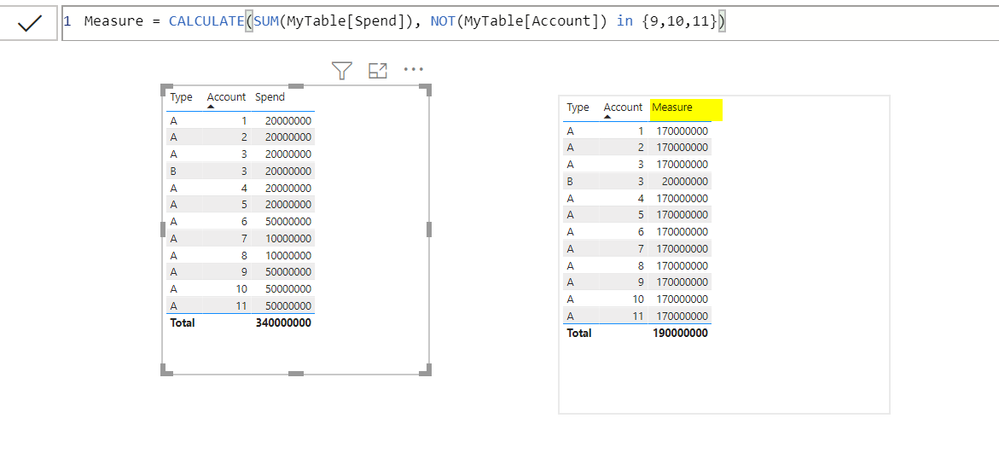
@dw700d , Please refer my below screen shot:
You can use a measure expression like this
NewMeasure = CALCULATE(SUM(Table[Spend]), NOT(Table[Account] IN {9,10,11}))
If Account is a text column, put each value in double quotes.
Regards,
Pat
To learn more about Power BI, follow me on Twitter or subscribe on YouTube.
Check out the April 2026 Power BI update to learn about new features.
Sign up to receive a private message when registration opens and key events begin.
If you have recently started exploring Fabric, we'd love to hear how it's going. Your feedback can help with product improvements.
| User | Count |
|---|---|
| 34 | |
| 31 | |
| 25 | |
| 20 | |
| 16 |
| User | Count |
|---|---|
| 61 | |
| 49 | |
| 28 | |
| 23 | |
| 23 |