Share feedback directly with Fabric product managers, participate in targeted research studies and influence the Fabric roadmap.
Sign up nowGet Fabric certified for FREE! Don't miss your chance! Learn more
I am trying to create a measure that calculates the Sum of all spend for Type A while excluding Accounts 9,10,11. Can anyone help me with this?
| Type | Spend | Account |
| A | 20,000,000 | 1 |
| A | 20,000,000 | 2 |
| A | 20,000,000 | 3 |
| A | 20,000,000 | 4 |
| A | 20,000,000 | 5 |
| A | 50,000,000 | 6 |
| A | 10,000,000 | 7 |
| A | 10,000,000 | 8 |
| A | 50,000,000 | 9 |
| A | 50,000,000 | 10 |
| A | 50,000,000 | 11 |
| B | 10,000,000 | 3 |
| B | 10,000,000 | 3 |
Solved! Go to Solution.
You can use a measure expression like this
NewMeasure = CALCULATE(SUM(Table[Spend]), NOT(Table[Account] IN {9,10,11}))
If Account is a text column, put each value in double quotes.
Regards,
Pat
To learn more about Power BI, follow me on Twitter or subscribe on YouTube.
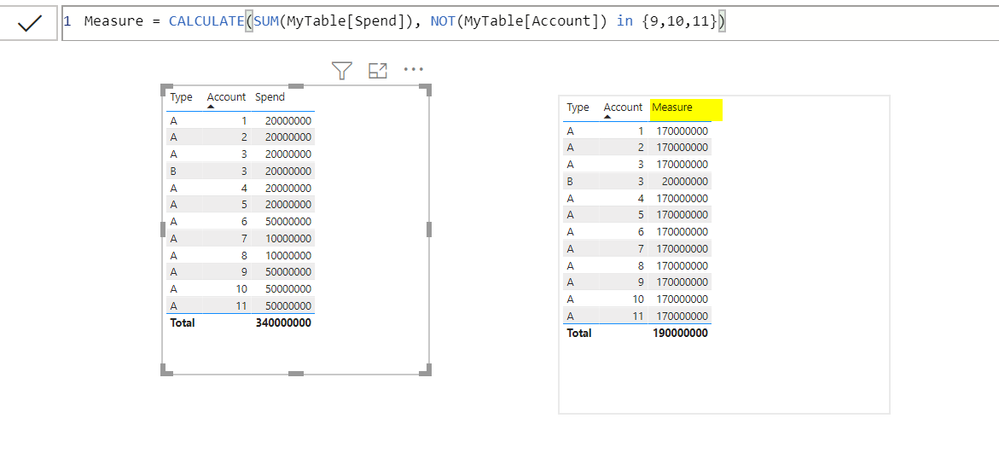
@dw700d , Please refer my below screen shot:
You can use a measure expression like this
NewMeasure = CALCULATE(SUM(Table[Spend]), NOT(Table[Account] IN {9,10,11}))
If Account is a text column, put each value in double quotes.
Regards,
Pat
To learn more about Power BI, follow me on Twitter or subscribe on YouTube.
Share feedback directly with Fabric product managers, participate in targeted research studies and influence the Fabric roadmap.
| User | Count |
|---|---|
| 62 | |
| 62 | |
| 42 | |
| 21 | |
| 18 |
| User | Count |
|---|---|
| 120 | |
| 113 | |
| 38 | |
| 29 | |
| 28 |