Join us at FabCon Atlanta from March 16 - 20, 2026, for the ultimate Fabric, Power BI, AI and SQL community-led event. Save $200 with code FABCOMM.
Register now!The Power BI Data Visualization World Championships is back! It's time to submit your entry. Live now!
I am trying to create a measure that calculates the Sum of all spend for Type A while excluding Accounts 9,10,11. Can anyone help me with this?
| Type | Spend | Account |
| A | 20,000,000 | 1 |
| A | 20,000,000 | 2 |
| A | 20,000,000 | 3 |
| A | 20,000,000 | 4 |
| A | 20,000,000 | 5 |
| A | 50,000,000 | 6 |
| A | 10,000,000 | 7 |
| A | 10,000,000 | 8 |
| A | 50,000,000 | 9 |
| A | 50,000,000 | 10 |
| A | 50,000,000 | 11 |
| B | 10,000,000 | 3 |
| B | 10,000,000 | 3 |
Solved! Go to Solution.
You can use a measure expression like this
NewMeasure = CALCULATE(SUM(Table[Spend]), NOT(Table[Account] IN {9,10,11}))
If Account is a text column, put each value in double quotes.
Regards,
Pat
To learn more about Power BI, follow me on Twitter or subscribe on YouTube.
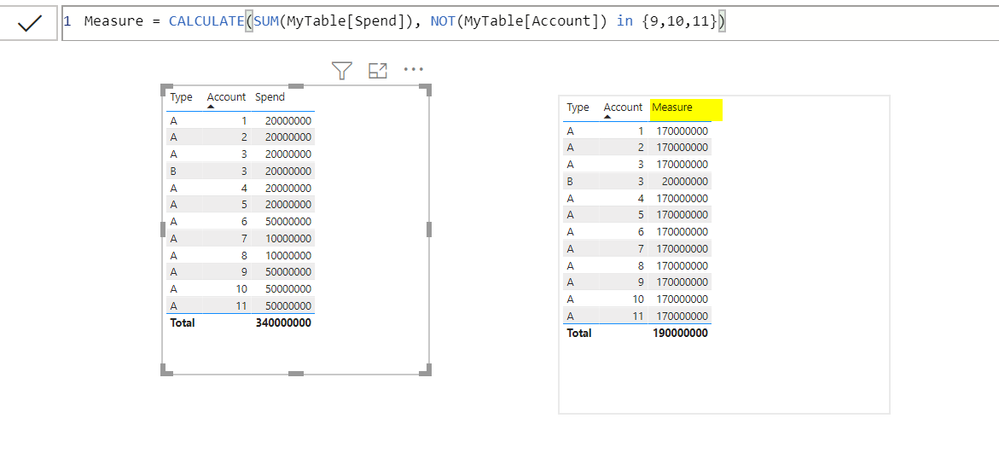
@dw700d , Please refer my below screen shot:
You can use a measure expression like this
NewMeasure = CALCULATE(SUM(Table[Spend]), NOT(Table[Account] IN {9,10,11}))
If Account is a text column, put each value in double quotes.
Regards,
Pat
To learn more about Power BI, follow me on Twitter or subscribe on YouTube.
| User | Count |
|---|---|
| 49 | |
| 37 | |
| 33 | |
| 22 | |
| 18 |
| User | Count |
|---|---|
| 132 | |
| 99 | |
| 56 | |
| 37 | |
| 37 |