cancel
Showing results for 
Search instead for 
Did you mean: 

Next up in the FabCon + SQLCon recap series: The roadmap for Microsoft SQL and Maximizing Developer experiences in Fabric. All sessions are available on-demand after the live show. Register now

Reply
Anonymous
Not applicable

Exclude values using DAX

Can you please advise how to solve the following issue: We have several Research activities that are part of the same 'Opdracht', so they have the same OPDRACHTID. Some activities are already invoiced and the ones that are invoiced have been marked with a factuurID. Now I want to make a report of the OPDRACHTID's containing Research activities that have never been invoiced. So when an OPDRACHTID contains only one activity that has been invoiced, I want to exclude the whole OPDRACHTID from the list. 


See below example:


OPDRACHTIDfactuurIDResearch activities
2018-0004-001 Authorize report
2018-0004-001 Authorize task
2018-0004-001 Report process control
2018-0004-00143246Periodic control
2018-0004-00143246Test article
2018-0004-002 Authorize report
2018-0004-002 Authorize task
2018-0004-002 Report process control
2018-0004-00243246Periodic control
2018-0004-003 Autorize report
2018-0004-003 Report process control
2018-0004-004 Authorize report
2018-0004-004 Authorize task
2018-0004-004 Report process control
2018-0004-00443846Periodic control
2018-0004-005 Authorize report
2018-0004-005 Authorize task
2018-0004-005 Report process control
2018-0004-006 Authorize report
2018-0004-006 Authorize task
2018-0004-006 Report process control
2018-0004-00644902Periodic control
2018-0004-00644902Control article


So from the above example I want to maintain the bold marked OPDRACHTID's in my report. All other OPDRACHTID's have at least one Research activity that has been invoiced (factuurID). Any advise on how I can achieve this would be much appreciated!

1 ACCEPTED SOLUTION
Zubair_Muhammad
Community Champion
Community Champion

@Anonymous


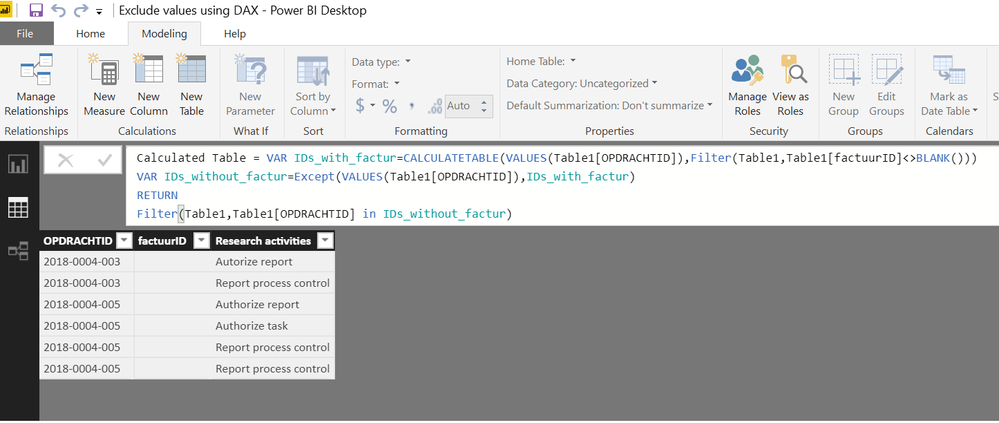
Try this calculated table

From Modelling tab>>>NEw Table


Calculated Table =
VAR IDs_with_factur =
    CALCULATETABLE (
        VALUES ( Table1[OPDRACHTID] ),
        FILTER ( Table1, Table1[factuurID] <> BLANK () )
    )
VAR IDs_without_factur =
    EXCEPT ( VALUES ( Table1[OPDRACHTID] ), IDs_with_factur )
RETURN
    FILTER ( Table1, Table1[OPDRACHTID] IN IDs_without_factur )

View solution in original post

3 REPLIES 3
Zubair_Muhammad
Community Champion
Community Champion

@Anonymous


Try this calculated table

From Modelling tab>>>NEw Table


Calculated Table =
VAR IDs_with_factur =
    CALCULATETABLE (
        VALUES ( Table1[OPDRACHTID] ),
        FILTER ( Table1, Table1[factuurID] <> BLANK () )
    )
VAR IDs_without_factur =
    EXCEPT ( VALUES ( Table1[OPDRACHTID] ), IDs_with_factur )
RETURN
    FILTER ( Table1, Table1[OPDRACHTID] IN IDs_without_factur )
Anonymous
Not applicable

Thanks very much @Zubair_Muhammad!! This solved my problem.

Helpful resources

Announcements
New to Fabric survey Carousel

New to Fabric Survey

If you have recently started exploring Fabric, we'd love to hear how it's going. Your feedback can help with product improvements.

Power BI DataViz World Championships carousel

Power BI DataViz World Championships - June 2026

A new Power BI DataViz World Championship is coming this June! Don't miss out on submitting your entry.

Join our Fabric User Panel

Join our Fabric User Panel

Share feedback directly with Fabric product managers, participate in targeted research studies and influence the Fabric roadmap.

March Power BI Update Carousel

Power BI Community Update - March 2026

Check out the March 2026 Power BI update to learn about new features.