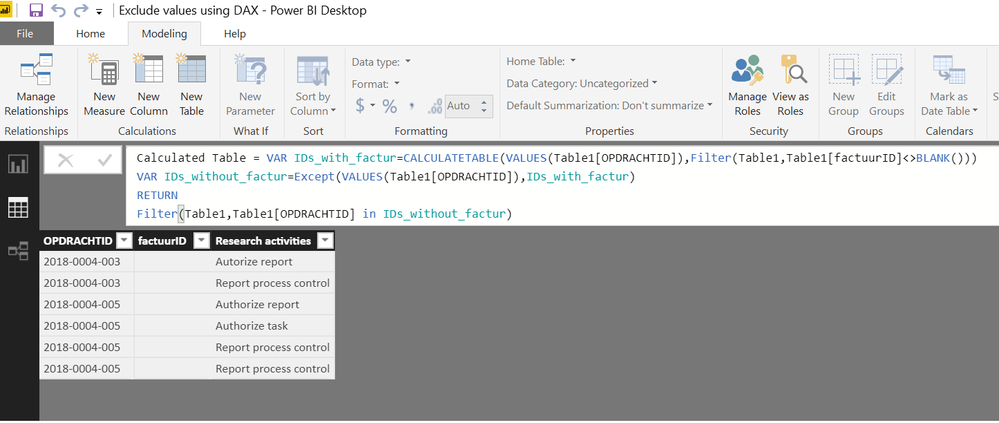
Can you please advise how to solve the following issue: We have several Research activities that are part of the same 'Opdracht', so they have the same OPDRACHTID. Some activities are already invoiced and the ones that are invoiced have been marked with a factuurID. Now I want to make a report of the OPDRACHTID's containing Research activities that have never been invoiced. So when an OPDRACHTID contains only one activity that has been invoiced, I want to exclude the whole OPDRACHTID from the list.
See below example:
| OPDRACHTID | factuurID | Research activities |
| 2018-0004-001 | | Authorize report |
| 2018-0004-001 | | Authorize task |
| 2018-0004-001 | | Report process control |
| 2018-0004-001 | 43246 | Periodic control |
| 2018-0004-001 | 43246 | Test article |
| 2018-0004-002 | | Authorize report |
| 2018-0004-002 | | Authorize task |
| 2018-0004-002 | | Report process control |
| 2018-0004-002 | 43246 | Periodic control |
| 2018-0004-003 | | Autorize report |
| 2018-0004-003 | | Report process control |
| 2018-0004-004 | | Authorize report |
| 2018-0004-004 | | Authorize task |
| 2018-0004-004 | | Report process control |
| 2018-0004-004 | 43846 | Periodic control |
| 2018-0004-005 | | Authorize report |
| 2018-0004-005 | | Authorize task |
| 2018-0004-005 | | Report process control |
| 2018-0004-005 | | Report process control |
| 2018-0004-006 | | Authorize report |
| 2018-0004-006 | | Authorize task |
| 2018-0004-006 | | Report process control |
| 2018-0004-006 | 44902 | Periodic control |
| 2018-0004-006 | 44902 | Control article |
So from the above example I want to maintain the bold marked OPDRACHTID's in my report. All other OPDRACHTID's have at least one Research activity that has been invoiced (factuurID). Any advise on how I can achieve this would be much appreciated!