cancel
Showing results for 
Search instead for 
Did you mean: 

The Power BI Data Visualization World Championships is back! Get ahead of the game and start preparing now! Learn more

Reply
ff6d
Helper I
Helper I

Using Conditions when filtering

Hi, 


I want to filter on shops in my data set if they ONLY used supplier A and B and not C. E.g. if the shop used supplier A for 50 euros, B for 20 euros and C for 1 euros this shop should be excluded 


Thanks,


Mikkel

6 REPLIES 6
v-yulgu-msft
Microsoft Employee
Microsoft Employee

Hi @ff6d,


If you want to filter out rows in data view, please create a calculated table as below:

Table =
FILTER (
    Sheet1,
    CALCULATE (
        COUNT ( Sheet1[euros] ),
        FILTER ( ALLEXCEPT ( Sheet1, Sheet1[Shops] ), Sheet1[Supplier] = "C" )
    )
        = 0
)

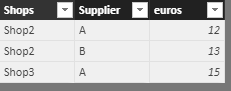
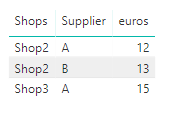
1.PNG2.PNG


If you want to filter out rows in visual view, please create such a measure, and add it to visual level filter, set its value to "is not blank".

flag1 =
IF (
    CALCULATE (
        COUNT ( Sheet1[Supplier] ),
        FILTER ( ALLEXCEPT ( Sheet1, Sheet1[Shops] ), Sheet1[Supplier] = "C" )
    )
        > 0,
    BLANK (),
    1
)

3.PNG


Best regards,

Yuliana Gu

Community Support Team _ Yuliana Gu
If this post helps, then please consider Accept it as the solution to help the other members find it more quickly.

Hi Yuliana,


When I use your measure my data filters on those who only use supplier C. Can you figure out how I can "reverse" the measure?


Thanks! 


Regards,

Hi @ff6d,


As you can see the result is correct in my test. Please make sure you wrote the correct DAX formula for above measure. Besides, check whether you set the right value for "Visual level filter", it should be "Is not blank".

flag1 =
IF (
    CALCULATE (
        COUNT ( Sheet1[Supplier] ),
        FILTER ( ALLEXCEPT ( Sheet1, Sheet1[Shops] ), Sheet1[Supplier] = "C" )
    )
        > 0,
    BLANK (),
    1
)

To help you "reverse" the measure, please share sample data and the actual measure formula you used which can better describe your scenario.


Regards,

Yuliana Gu

Community Support Team _ Yuliana Gu
If this post helps, then please consider Accept it as the solution to help the other members find it more quickly.
Stachu
Community Champion
Community Champion

can't you just exclude all the customers that bought something from supplier C?
Otherwise you can create a measure that would show Blank if supplier C was used


Did I answer your question? Mark my post as a solution!
Thank you for the kudos 🙂

Try the problem is that I do not know how to exclude those who have 🙂 

I found a simple solution 🙂 Thanks!

Helpful resources

Announcements
Power BI DataViz World Championships

Power BI Dataviz World Championships

The Power BI Data Visualization World Championships is back! Get ahead of the game and start preparing now!

December 2025 Power BI Update Carousel

Power BI Monthly Update - December 2025

Check out the December 2025 Power BI Holiday Recap!

FabCon Atlanta 2026 carousel

FabCon Atlanta 2026

Join us at FabCon Atlanta, March 16-20, for the ultimate Fabric, Power BI, AI and SQL community-led event. Save $200 with code FABCOMM.