Get certified for free when you join Fabric Data Days 2026 and dive into Fabric, Power BI, SQL, AI, and other essential data skills.
Join nowJuly 28 - August 9 | Final Round of the Power BI Dataviz World Championships. This is your chance. Learn more
Hi,
I want to filter on shops in my data set if they ONLY used supplier A and B and not C. E.g. if the shop used supplier A for 50 euros, B for 20 euros and C for 1 euros this shop should be excluded
Thanks,
Mikkel
Hi @ff6d,
If you want to filter out rows in data view, please create a calculated table as below:
Table =
FILTER (
Sheet1,
CALCULATE (
COUNT ( Sheet1[euros] ),
FILTER ( ALLEXCEPT ( Sheet1, Sheet1[Shops] ), Sheet1[Supplier] = "C" )
)
= 0
)
If you want to filter out rows in visual view, please create such a measure, and add it to visual level filter, set its value to "is not blank".
flag1 =
IF (
CALCULATE (
COUNT ( Sheet1[Supplier] ),
FILTER ( ALLEXCEPT ( Sheet1, Sheet1[Shops] ), Sheet1[Supplier] = "C" )
)
> 0,
BLANK (),
1
)
Best regards,
Yuliana Gu
Hi Yuliana,
When I use your measure my data filters on those who only use supplier C. Can you figure out how I can "reverse" the measure?
Thanks!
Regards,
Hi @ff6d,
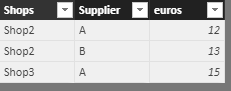
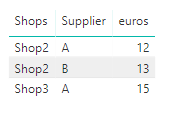
As you can see the result is correct in my test. Please make sure you wrote the correct DAX formula for above measure. Besides, check whether you set the right value for "Visual level filter", it should be "Is not blank".
flag1 =
IF (
CALCULATE (
COUNT ( Sheet1[Supplier] ),
FILTER ( ALLEXCEPT ( Sheet1, Sheet1[Shops] ), Sheet1[Supplier] = "C" )
)
> 0,
BLANK (),
1
)
To help you "reverse" the measure, please share sample data and the actual measure formula you used which can better describe your scenario.
Regards,
Yuliana Gu
can't you just exclude all the customers that bought something from supplier C?
Otherwise you can create a measure that would show Blank if supplier C was used
Try the problem is that I do not know how to exclude those who have 🙂
I found a simple solution 🙂 Thanks!
If you love stickers, then you will definitely want to check out our community sticker challenge, Barcelona edition!
Check out the July 2026 Power BI update to learn about new features.
| User | Count |
|---|---|
| 30 | |
| 28 | |
| 23 | |
| 21 | |
| 19 |
| User | Count |
|---|---|
| 41 | |
| 31 | |
| 18 | |
| 18 | |
| 15 |