cancel
Showing results for 
Search instead for 
Did you mean: 

Try your skills in the Power BI Dataviz World Championship! Round one ends June 26. Join now

Reply
mparp
New Member

Error adding WDATP Reports.pbit

Hello. I am new in PowerBI and I met an issue. 

I am trying to integrate Power BI with my WD ATP azure instalation. I did everything like instruction says but when I open WDATP Reports.pbit file in Power BI desktop app I get this errors:


Machines
Load was cancelled by an error in loading a previous table.
MachineSecurityStates
Load was cancelled by an error in loading a previous table.
CveInfo
Load was cancelled by an error in loading a previous table.
KbInfo
Load was cancelled by an error in loading a previous table.
Alerts
Load was cancelled by an error in loading a previous table.
Blocked Files
Load was cancelled by an error in loading a previous table.
MachinePropertiesReqAtt
Load was cancelled by an error in loading a previous table.
SeverityOrder
Load was cancelled by an error in loading a previous table.
PropertyCategories
Load was cancelled by an error in loading a previous table.
CVEToThreatMapping
Load was cancelled by an error in loading a previous table.
MachineGroups
The key didn't match any rows in the table.
 
 
Taking into the account that I am totaly new in Power BI I may do something wrong but I have no any idea how to fix or trace those issues 
 
Thank you.


1 ACCEPTED SOLUTION
Anonymous
Not applicable

Hi @mparp ,

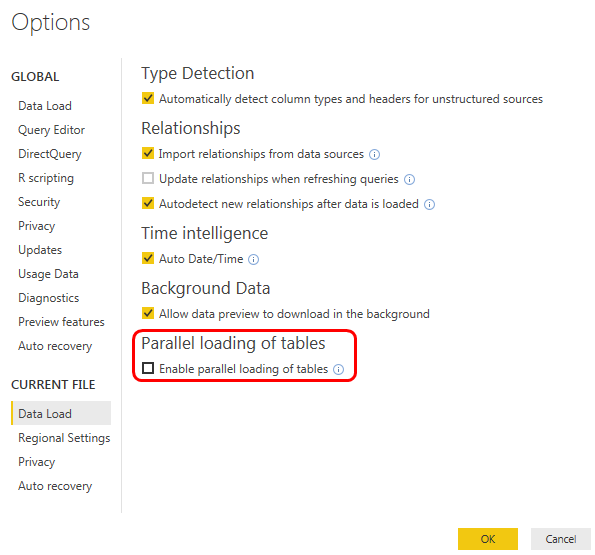
I'd like to suggest you to turn on 'parallel load' option to loading all tables at same time instead load table one by one(on this mode, power bi will failed to load following tables if previous table load failed).

Power BI - Parallel Loading.png

After check you error message, these issue seems more related to 'MachineGroups' table field keys not match. I'd like to suggest you to enter to 'query editor'-'>Machine Groups' table. Then check and fix query steps if fields are added or remove from datasource side.(data source fields not matched with fields cached in query steps)

Regards,

Xiaoxin Sheng

View solution in original post

1 REPLY 1
Anonymous
Not applicable

Hi @mparp ,

I'd like to suggest you to turn on 'parallel load' option to loading all tables at same time instead load table one by one(on this mode, power bi will failed to load following tables if previous table load failed).

Power BI - Parallel Loading.png

After check you error message, these issue seems more related to 'MachineGroups' table field keys not match. I'd like to suggest you to enter to 'query editor'-'>Machine Groups' table. Then check and fix query steps if fields are added or remove from datasource side.(data source fields not matched with fields cached in query steps)

Regards,

Xiaoxin Sheng

Helpful resources

Announcements
Fabric Data Days is here Carousel

Fabric Data Days 2026

Don't miss out on Data Days, June 15 through August 7. Learn Fabric, Power BI, SQL, AI and more.

Power BI DataViz World Championships carousel

Power BI DataViz World Championships - June 2026

A new Power BI DataViz World Championship is coming this June! Don't miss out on submitting your entry.