Forum Discussion

Error adding WDATP Reports.pbit
Hello. I am new in PowerBI and I met an issue.
I am trying to integrate Power BI with my WD ATP azure instalation. I did everything like instruction says but when I open WDATP Reports.pbit file in Power BI desktop app I get this errors:
 Anonymous7 years ago
Hi mparp ,
I'd like to suggest you to turn on 'parallel load' option to loading all tables at same time instead load table one by one(on this mode, power bi will failed to load following tables if previous table load failed).
After check you error message, these issue seems more related to 'MachineGroups' table field keys not match. I'd like to suggest you to enter to 'query editor'-'>Machine Groups' table. Then check and fix query steps if fields are added or remove from datasource side.(data source fields not matched with fields cached in query steps)
Regards,
Xiaoxin Sheng
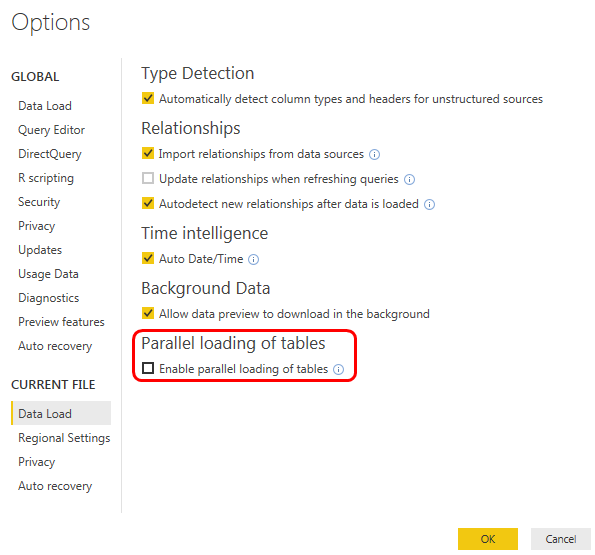
1 Reply
- AnonymousNot applicable
Hi mparp ,
I'd like to suggest you to turn on 'parallel load' option to loading all tables at same time instead load table one by one(on this mode, power bi will failed to load following tables if previous table load failed).
After check you error message, these issue seems more related to 'MachineGroups' table field keys not match. I'd like to suggest you to enter to 'query editor'-'>Machine Groups' table. Then check and fix query steps if fields are added or remove from datasource side.(data source fields not matched with fields cached in query steps)
Regards,
Xiaoxin Sheng