cancel
Showing results for 
Search instead for 
Did you mean: 

July 7 - July 17 | Round 2 of the Power BI Dataviz World Championships. Don't miss your chance! Learn more

Reply
Jkaelin
Resolver I
Resolver I

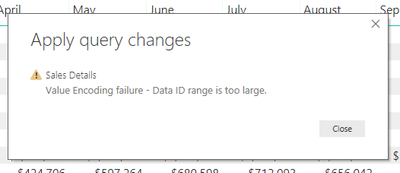
Error Message: Value Encoding Error - Data ID Range is too Large

Good afternoon,


*I searched for similiar posts but not much seems out there regarding this error, except that it could be something with underlying data.


*I run 8GB Ram, i7 processor, using power bi desktop.


Any thoughts on what the below means?  I was importing several Excel files from a folder.  I'm thinking it could be a memory limit or data limit.  The underlying data seems fine.

Value Encoding Error - Data ID Range is too Large.PNGThank you,

Jaes


1 ACCEPTED SOLUTION
Anonymous
Not applicable

Hi @Jkaelin,


I think this should related to query editor transform operations, have you enabled any advance transform operations in query editor?(combine, merge, append, refer other query, custom functions)
BTW, I test to get data for excel table with hundreds of columns but can't reproduce your issue.


Regards,

Xiaoxin Sheng

View solution in original post

6 REPLIES 6
Anonymous
Not applicable

Hi @Jkaelin,


How many characters 'data id range' column stored? How many columns? Can you please provide more detail informations?

How to Get Your Question Answered Quickly


Regards,

Xiaoxin Sheng

Hi @Anonymous,


I don't have a column labeled, "Data ID range".  I believe this is a microsoft error.  The table has 80 columns.  Sorry if I didn't initially provide enough information.  


I guess I'm asking if their is any source that explains errors so I know best where to troubleshoot?


Thank you,


Anonymous
Not applicable

Hi @Jkaelin,


I think this should related to query editor transform operations, have you enabled any advance transform operations in query editor?(combine, merge, append, refer other query, custom functions)
BTW, I test to get data for excel table with hundreds of columns but can't reproduce your issue.


Regards,

Xiaoxin Sheng

@Anonymous


Thank you for your help.  After an extended period of testing, it appears some values have an extensive character length.  Although not resolved, I was able to pin-point the columns.  This thread helped me narrow down the troubleshooting.  Thank you.

Hi @Jkaelin ,


I'm with the same problem as you were.


Could you please tell me what did you do to find the value with an extensive character length?


Thanks!

I had to count how many characters were in the some columns.  I used Power Query to trim the character lenght in some of the columns that had long names.  That may help!  

Helpful resources

Announcements
FabCon and SQLCon Barcelona 2026

FabCon & SQLCon – Barcelona 2026

Join us in Barcelona for FabCon and SQLCon, the Fabric, Power BI, SQL, and AI community event. Save €200 with code FABCMTY200.

60 days of Data Days Carousel

Data Days 2026

Join Fabric Data Days 2026: 60 days of free live/on-demand sessions, challenges, study groups, and certification opportunities.

Power BI DataViz World Championships carousel

Power BI DataViz World Championships - June 2026

A new Power BI DataViz World Championship is coming this June! Don't miss out on submitting your entry.