This is best Fabric, Power BI, SQL and AI community event. How do we know? The last event sold out! Save €200 with code FABCMTY200.
Register nowJuly 28 - August 9 | Final Round of the Power BI Dataviz World Championships. This is your chance. Learn more
Hi, I added new data source and I chose wrong logging settings. I got error message and from there I can choose "Edit", but after that logging settings doesn't appear, only url is possible to define again. Settigns doesn't appear in "Data source settings", because source was not succesfully connected. I tried to reboot computer and updated Power BI desktop, but I still got the same error message. How can I change logging settings?
Solved! Go to Solution.
Hi @saku
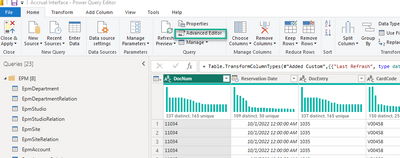
Go to "Advanced Editor"
And change the settings from there at the beginning of the code
Hi, Thank you for your reply, but nothing is shown in queries, because source was not succesfully added 😕
Hi @saku
Go to "Advanced Editor"
And change the settings from there at the beginning of the code
I finally manage to edit settings by adding manually Query and source -> then it appeared to Data Source Settings also.
Join us in Barcelona for FabCon and SQLCon, the Fabric, Power BI, SQL, and AI community event. Save €200 with code FABCMTY200.
If you love stickers, then you will definitely want to check out our community sticker challenge, Barcelona edition!
Check out the July 2026 Power BI update to learn about new features.
| User | Count |
|---|---|
| 25 | |
| 23 | |
| 20 | |
| 18 | |
| 14 |
| User | Count |
|---|---|
| 24 | |
| 20 | |
| 20 | |
| 19 | |
| 19 |