cancel
Showing results for 
Search instead for 
Did you mean: 

July 7 - July 17 | Round 2 of the Power BI Dataviz World Championships. Don't miss your chance! Learn more

Reply
saku
New Member

Editing data source settings

Hi, I added new data source and I chose wrong logging settings. I got error message and from there I can choose "Edit", but after that logging settings doesn't appear, only url is possible to define again. Settigns doesn't appear in "Data source settings", because source was not succesfully connected. I tried to reboot computer and updated Power BI desktop, but I still got the same error message. How can I change logging settings?

1 ACCEPTED SOLUTION
netanel
Post Prodigy
Post Prodigy

Hi @saku 


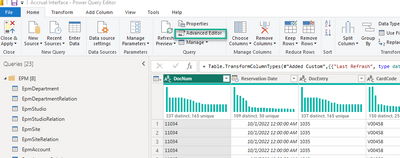
Go to "Advanced Editor"

netanel_0-1671009706892.png


And change the settings from there at the beginning of the code


netanel_1-1671009888410.png


Did I answer your question?
Mark my post as a solution!
Appreciate your Kudos!

Connect on Linkedin
linkedin.com/in/netanel-shriki

View solution in original post

3 REPLIES 3
saku
New Member

Hi, Thank you for your reply, but nothing is shown in queries, because source was not succesfully added 😕

netanel
Post Prodigy
Post Prodigy

Hi @saku 


Go to "Advanced Editor"

netanel_0-1671009706892.png


And change the settings from there at the beginning of the code


netanel_1-1671009888410.png


Did I answer your question?
Mark my post as a solution!
Appreciate your Kudos!

Connect on Linkedin
linkedin.com/in/netanel-shriki

I finally manage to edit settings by adding manually Query and source -> then it appeared to Data Source Settings also.

Helpful resources

Announcements
FabCon and SQLCon Barcelona 2026

FabCon & SQLCon – Barcelona 2026

Join us in Barcelona for FabCon and SQLCon, the Fabric, Power BI, SQL, and AI community event. Save €200 with code FABCMTY200.

60 days of Data Days Carousel

Data Days 2026

Join Data Days 2026: 60 days of free live/on-demand sessions, challenges, study groups, and certification opportunities.

Power BI DataViz World Championships carousel

Power BI DataViz World Championships - June 2026

A new Power BI DataViz World Championship is coming this June! Don't miss out on submitting your entry.

Top Solution Authors