Hi @Anonymous ,
One sample for your reference, please check the following steps as below.
1. dupilicate the fact table, then tranpose and unpivot the table as below. M code for your reference.
let
    Source = Table.FromRows(Json.Document(Binary.Decompress(Binary.FromText("HcipFQAgDETBXlZjAqGavAiO/muAHzNiIrTUtOxzwJQttLnOwag73ODA6y7nHExlPg==", BinaryEncoding.Base64), Compression.Deflate)), let _t = ((type text) meta [Serialized.Text = true]) in type table [category = _t, category.1 = _t, category.2 = _t, value = _t]),
    #"Changed Type" = Table.TransformColumnTypes(Source,{{"category", type text}, {"category.1", type text}, {"category.2", type text}, {"value", Int64.Type}}),
    #"Demoted Headers" = Table.DemoteHeaders(#"Changed Type"),
    #"Changed Type1" = Table.TransformColumnTypes(#"Demoted Headers",{{"Column1", type text}, {"Column2", type text}, {"Column3", type text}, {"Column4", type any}}),
    #"Transposed Table" = Table.Transpose(#"Changed Type1"),
    #"Filtered Rows" = Table.SelectRows(#"Transposed Table", each ([Column1] <> "value")),
    #"Unpivoted Other Columns" = Table.UnpivotOtherColumns(#"Filtered Rows", {"Column1"}, "Attribute", "Value"),
    #"Removed Columns" = Table.RemoveColumns(#"Unpivoted Other Columns",{"Attribute"}),
    #"Renamed Columns" = Table.RenameColumns(#"Removed Columns",{{"Column1", "category type"}, {"Value", "category"}})
in
    #"Renamed Columns"
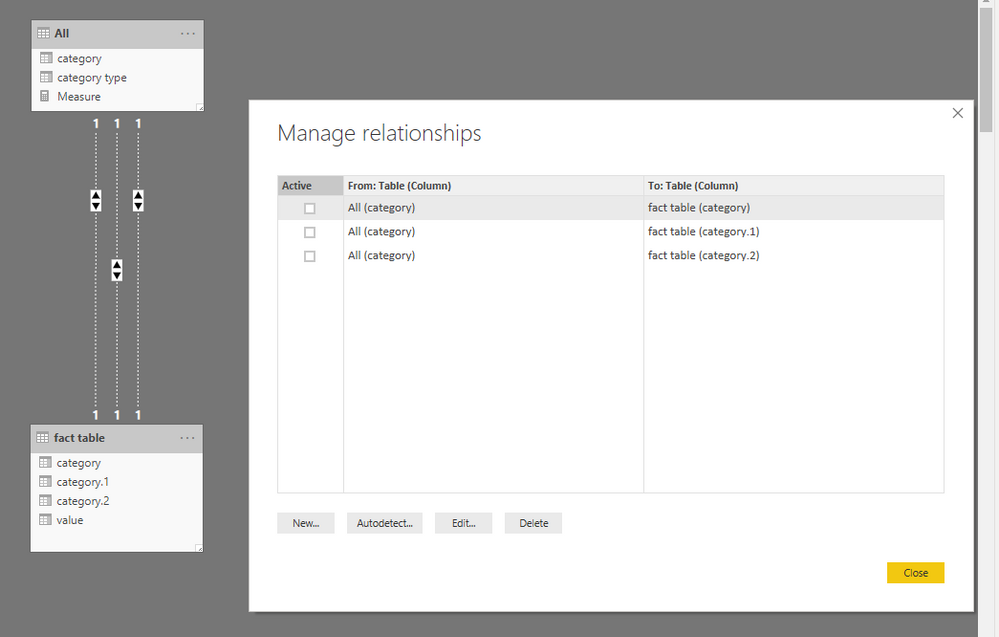
2. Create relationship between tables as below.
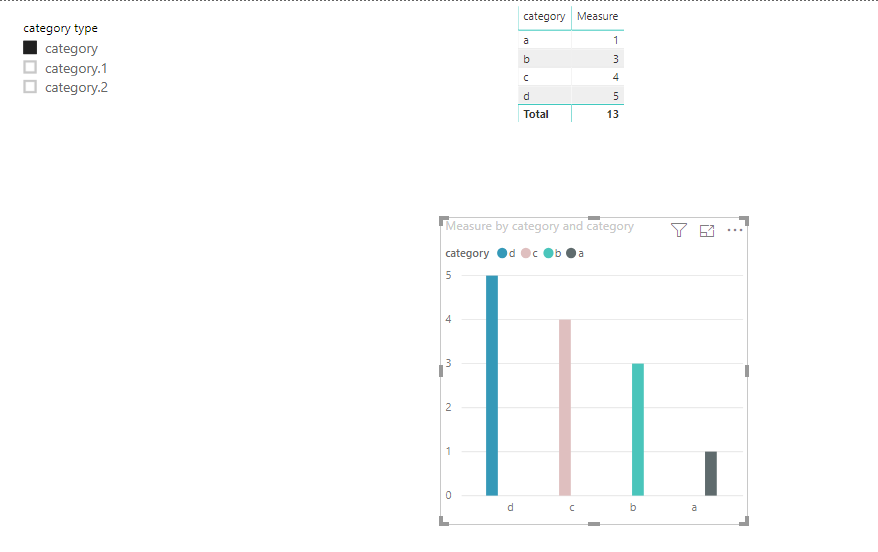
3. To create a measure as below to make the goal achieved.
Measure =
VAR c =
    CALCULATE (
        SUM ( 'fact table'[value] ),
        USERELATIONSHIP ( 'fact table'[category], 'All'[category] )
    )
VAR c1 =
    CALCULATE (
        SUM ( 'fact table'[value] ),
        USERELATIONSHIP ( 'fact table'[category.1], 'All'[category] )
    )
VAR c2 =
    CALCULATE (
        SUM ( 'fact table'[value] ),
        USERELATIONSHIP ( 'fact table'[category.2], 'All'[category] )
    )
VAR sele =
    SELECTEDVALUE ( 'All'[category type] )
RETURN
    IF (
        ISBLANK ( sele ),
        BLANK (),
        SWITCH ( sele, "category", c, "category.1", c1, "category.2", c2 )
    )
Community Support Team _ Frank
If this post helps, then please consider Accept it as the solution to help the others find it more quickly.