
cancel
Showing results for 
Search instead for 
Did you mean: 

July 7 - July 17 | Round 2 of the Power BI Dataviz World Championships. Don't miss your chance! Learn more

Reply
Dan849800
Frequent Visitor

Dynamic column section based on filter

I have six columns in table and want to create two slicers based on dails and hours, if user select Dials, 'dail information' should show on wheel/ vice versa, It means if user select dails(Slicer1) first 3 columns in pic should display on wheel

                                               if user select Hours(Slicer2) last 3 columns in pic should display on wheel.


Image.PNG

1 ACCEPTED SOLUTION
v-huizhn-msft
Microsoft Employee
Microsoft Employee

Hi @Dan849800,

For your requriement, you want create two slicer, one slicer including Dail1, Dail2, Dail3 values, and another slicer including Hour1, Hour2, Hour3 values, right? If it is, I try to reproduce your scenario as follows.

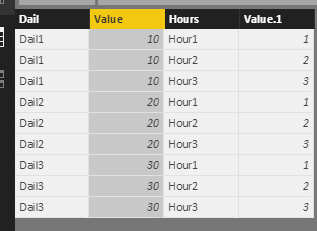
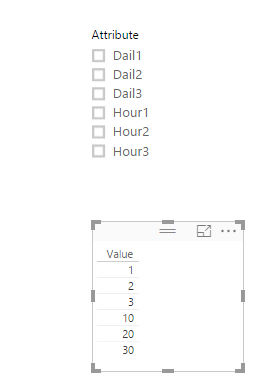
Right click Edit Query, select Dail1, Dail2, Dail3 columns->click Unpivot columns under Tranform on how page. Then select another Hour1, Hour2, Hour3 columns->click Unpivot columns, click Close and Apply, you will get the following table.

2.PNG


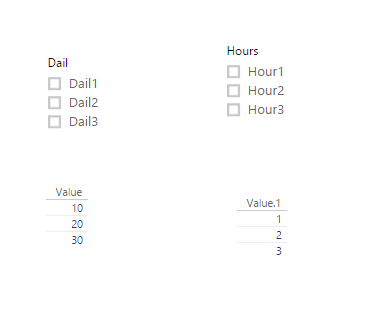
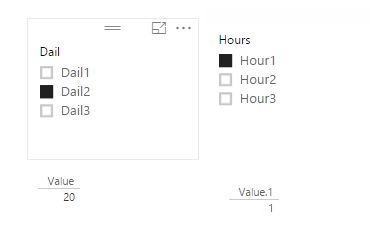
Create two slicers including Dail column and Hours separatly. And create table visul to display the results.

11.PNG12.PNG

For another thing, I personally suggest you create one slicer.

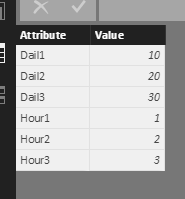
1. You'd better select all the columns->Unpivot columns, you will get table.

2.PNG


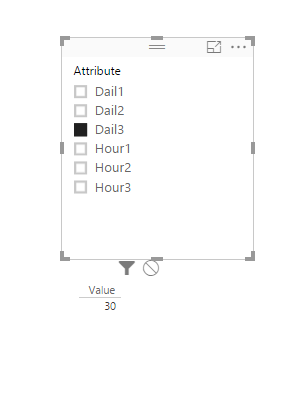
2. Create a slicer including Attribute column, you will get corresponding value when you select any value in the slicer.

3.png4.PNG


If you have other issues, don't hesitate to let me know.


Best Regards,
Angelia


View solution in original post

2 REPLIES 2
v-huizhn-msft
Microsoft Employee
Microsoft Employee

Hi @Dan849800,

For your requriement, you want create two slicer, one slicer including Dail1, Dail2, Dail3 values, and another slicer including Hour1, Hour2, Hour3 values, right? If it is, I try to reproduce your scenario as follows.

Right click Edit Query, select Dail1, Dail2, Dail3 columns->click Unpivot columns under Tranform on how page. Then select another Hour1, Hour2, Hour3 columns->click Unpivot columns, click Close and Apply, you will get the following table.

2.PNG


Create two slicers including Dail column and Hours separatly. And create table visul to display the results.

11.PNG12.PNG

For another thing, I personally suggest you create one slicer.

1. You'd better select all the columns->Unpivot columns, you will get table.

2.PNG


2. Create a slicer including Attribute column, you will get corresponding value when you select any value in the slicer.

3.png4.PNG


If you have other issues, don't hesitate to let me know.


Best Regards,
Angelia


Hi Angelia,


Awesome, genies.it works! , I only required two fileds in slicers (Dails/Hours), I have created calculated colum for this.


I have few more questions, if possible please share email id. Thank you again!

Helpful resources

Announcements
FabCon and SQLCon Barcelona 2026

FabCon & SQLCon – Barcelona 2026

Join us in Barcelona for FabCon and SQLCon, the Fabric, Power BI, SQL, and AI community event. Save €200 with code FABCMTY200.

60 days of Data Days Carousel

Data Days 2026

Join Data Days 2026: 60 days of free live/on-demand sessions, challenges, study groups, and certification opportunities.

Power BI DataViz World Championships carousel

Power BI DataViz World Championships - June 2026

A new Power BI DataViz World Championship is coming this June! Don't miss out on submitting your entry.

Top Solution Authors