
Don't miss your chance to take the Fabric Data Engineer (DP-600) exam for FREE! Find out how by watching the DP-600 session on-demand now through April 28th.
Learn moreJoin the FabCon + SQLCon recap series. Up next: Power BI, Real-Time Intelligence, IQ and AI, and Data Factory take center stage. All sessions are available on-demand after the live show. Register now
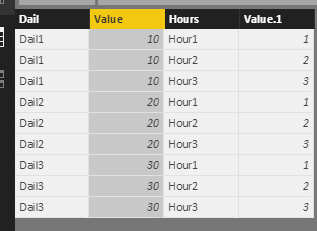
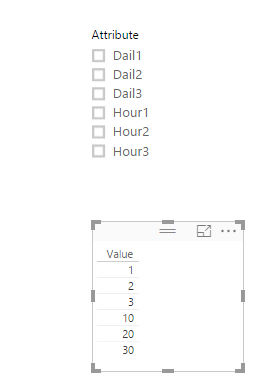
I have six columns in table and want to create two slicers based on dails and hours, if user select Dials, 'dail information' should show on wheel/ vice versa, It means if user select dails(Slicer1) first 3 columns in pic should display on wheel
if user select Hours(Slicer2) last 3 columns in pic should display on wheel.
Solved! Go to Solution.
Hi @Dan849800,
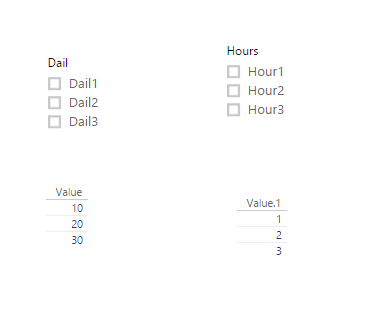
For your requriement, you want create two slicer, one slicer including Dail1, Dail2, Dail3 values, and another slicer including Hour1, Hour2, Hour3 values, right? If it is, I try to reproduce your scenario as follows.
Right click Edit Query, select Dail1, Dail2, Dail3 columns->click Unpivot columns under Tranform on how page. Then select another Hour1, Hour2, Hour3 columns->click Unpivot columns, click Close and Apply, you will get the following table.
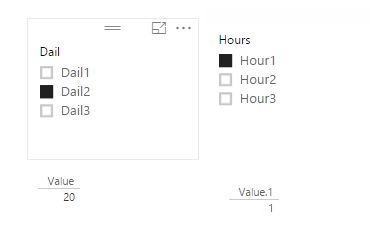
Create two slicers including Dail column and Hours separatly. And create table visul to display the results.
For another thing, I personally suggest you create one slicer.
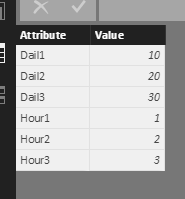
1. You'd better select all the columns->Unpivot columns, you will get table.
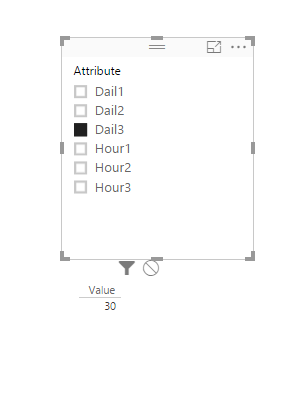
2. Create a slicer including Attribute column, you will get corresponding value when you select any value in the slicer.
If you have other issues, don't hesitate to let me know.
Best Regards,
Angelia
Hi @Dan849800,
For your requriement, you want create two slicer, one slicer including Dail1, Dail2, Dail3 values, and another slicer including Hour1, Hour2, Hour3 values, right? If it is, I try to reproduce your scenario as follows.
Right click Edit Query, select Dail1, Dail2, Dail3 columns->click Unpivot columns under Tranform on how page. Then select another Hour1, Hour2, Hour3 columns->click Unpivot columns, click Close and Apply, you will get the following table.
Create two slicers including Dail column and Hours separatly. And create table visul to display the results.
For another thing, I personally suggest you create one slicer.
1. You'd better select all the columns->Unpivot columns, you will get table.
2. Create a slicer including Attribute column, you will get corresponding value when you select any value in the slicer.
If you have other issues, don't hesitate to let me know.
Best Regards,
Angelia
Hi Angelia,
Awesome, genies.it works! , I only required two fileds in slicers (Dails/Hours), I have created calculated colum for this.
I have few more questions, if possible please share email id. Thank you again!
Check out the April 2026 Power BI update to learn about new features.
If you have recently started exploring Fabric, we'd love to hear how it's going. Your feedback can help with product improvements.
A new Power BI DataViz World Championship is coming this June! Don't miss out on submitting your entry.
| User | Count |
|---|---|
| 43 | |
| 38 | |
| 35 | |
| 21 | |
| 15 |
| User | Count |
|---|---|
| 65 | |
| 58 | |
| 28 | |
| 27 | |
| 25 |