cancel
Showing results for 
Search instead for 
Did you mean: 

The Fabric community is upgrading! Read all of the details including the timeline and what you can expect. Learn more

Reply
szaman
New Member

Dynamic Column Calculation Based on Date Slider

Hi, I am fairly new to Power BI and would greatly appreciate it if someone can help me with this business case.


Problem statement seems simple.  I need to calculate total employee cost at any given point in time

  • I have a date table from which I created a date slider
  • I have a table with employee, their salary, their monthly run rate (which is salary/12). The the date table is linked to the employee table
  • I need to calculate the Total Cost = (Date Variance * Monthly Run Rate) /30 days
  • Date Variance = Date Selection – Termination Date

I created a new measure for the Date Variance and new measure For the Total Cost that allows the calculation to done at the row level, which is what I want.

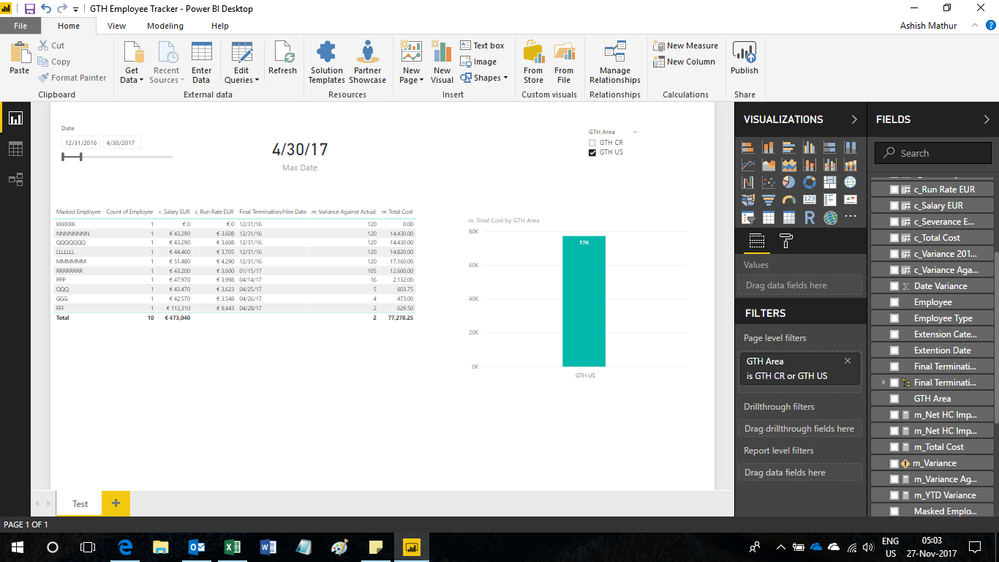
However, somehow I am not able to aggreggate the Total Cost.

I tried the same calculation for new column, but that's not working either.


What did I do wrong?
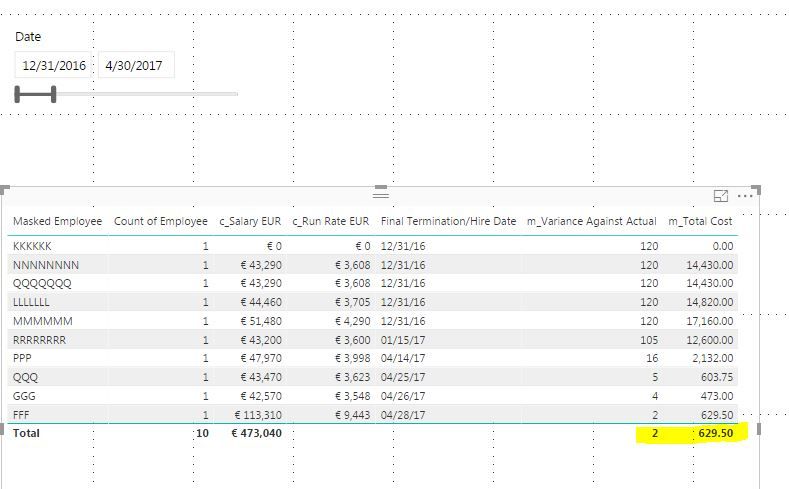
 

 Capture.JPG

1 ACCEPTED SOLUTION

Hi,


Edit your m_totalCost formula to


= if(HASONEVALUE('FTE Tracking'[Masked Employee]),[m_Variance Against Actual]* max('FTE Tracking'[c_Run Rate EUR])/30,SUMX(SUMMARIZE(VALUES('FTE Tracking'[Masked Employee]),[Masked Employee],"ABCD",[m_Variance Against Actual]* max('FTE Tracking'[c_Run Rate EUR])/30),[ABCD]))


Hope this helps.


Untitled.png


Regards,
Ashish Mathur
http://www.ashishmathur.com
https://www.linkedin.com/in/excelenthusiasts/

View solution in original post

5 REPLIES 5
Ashish_Mathur
Super User
Super User

Hi,


Share the link from where i can download your file.


Regards,
Ashish Mathur
http://www.ashishmathur.com
https://www.linkedin.com/in/excelenthusiasts/

Hi, here's the link the files. Thank you in advance.

Hi,


Edit your m_totalCost formula to


= if(HASONEVALUE('FTE Tracking'[Masked Employee]),[m_Variance Against Actual]* max('FTE Tracking'[c_Run Rate EUR])/30,SUMX(SUMMARIZE(VALUES('FTE Tracking'[Masked Employee]),[Masked Employee],"ABCD",[m_Variance Against Actual]* max('FTE Tracking'[c_Run Rate EUR])/30),[ABCD]))


Hope this helps.


Untitled.png


Regards,
Ashish Mathur
http://www.ashishmathur.com
https://www.linkedin.com/in/excelenthusiasts/

This works like a charm!!!! I would not have been able to figure this out myself. Thank you very much.

You are welcome.


Regards,
Ashish Mathur
http://www.ashishmathur.com
https://www.linkedin.com/in/excelenthusiasts/

Helpful resources

Announcements
FabCon and SQLCon Barcelona 2026

FabCon & SQLCon – Barcelona 2026

Join us in Barcelona for FabCon and SQLCon, the Fabric, Power BI, SQL, and AI community event. Save €200 with code FABCMTY200.

Power BI DataViz World Championships carousel

Power BI DataViz World Championships - June 2026

A new Power BI DataViz World Championship is coming this June! Don't miss out on submitting your entry.