Get certified for free when you join Fabric Data Days 2026 and dive into Fabric, Power BI, SQL, AI, and other essential data skills.
Join nowJuly 7 - July 17 | Round 2 of the Power BI Dataviz World Championships. Don't miss your chance! Learn more
Hi, I am fairly new to Power BI and would greatly appreciate it if someone can help me with this business case.
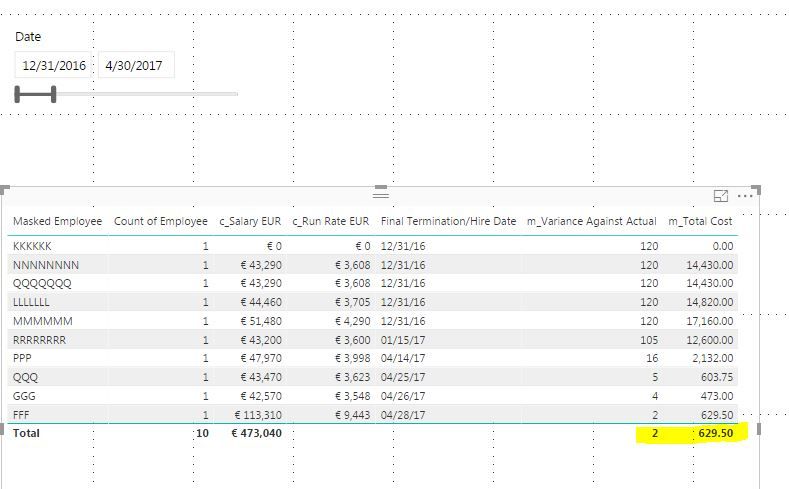
Problem statement seems simple. I need to calculate total employee cost at any given point in time
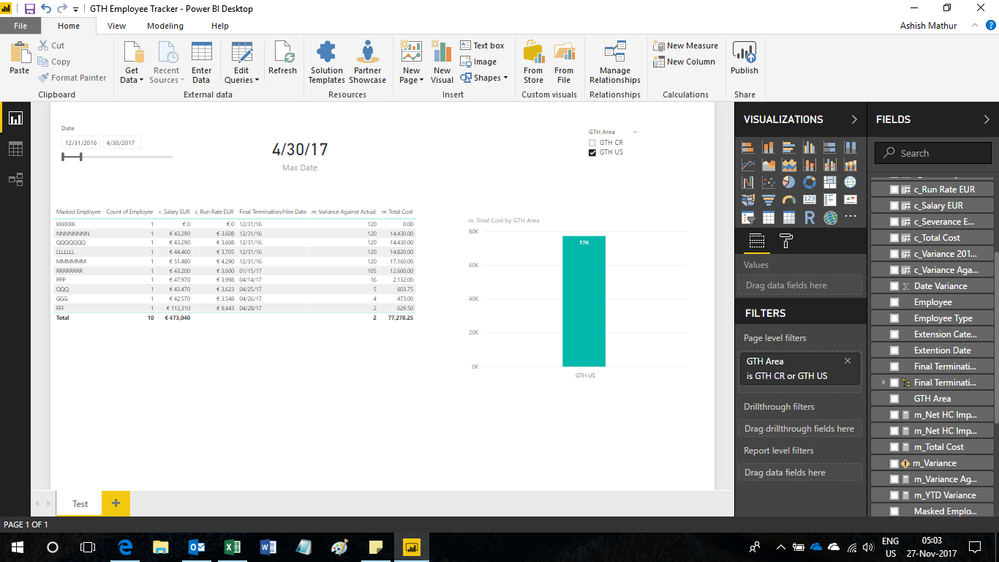
I created a new measure for the Date Variance and new measure For the Total Cost that allows the calculation to done at the row level, which is what I want.
However, somehow I am not able to aggreggate the Total Cost.
I tried the same calculation for new column, but that's not working either.
What did I do wrong?
Solved! Go to Solution.
Hi,
Edit your m_totalCost formula to
= if(HASONEVALUE('FTE Tracking'[Masked Employee]),[m_Variance Against Actual]* max('FTE Tracking'[c_Run Rate EUR])/30,SUMX(SUMMARIZE(VALUES('FTE Tracking'[Masked Employee]),[Masked Employee],"ABCD",[m_Variance Against Actual]* max('FTE Tracking'[c_Run Rate EUR])/30),[ABCD]))
Hope this helps.
Hi,
Share the link from where i can download your file.
Hi,
Edit your m_totalCost formula to
= if(HASONEVALUE('FTE Tracking'[Masked Employee]),[m_Variance Against Actual]* max('FTE Tracking'[c_Run Rate EUR])/30,SUMX(SUMMARIZE(VALUES('FTE Tracking'[Masked Employee]),[Masked Employee],"ABCD",[m_Variance Against Actual]* max('FTE Tracking'[c_Run Rate EUR])/30),[ABCD]))
Hope this helps.
This works like a charm!!!! I would not have been able to figure this out myself. Thank you very much.
You are welcome.
Join us in Barcelona for FabCon and SQLCon, the Fabric, Power BI, SQL, and AI community event. Save €200 with code FABCMTY200.
Join Fabric Data Days 2026: 60 days of free live/on-demand sessions, challenges, study groups, and certification opportunities.
| User | Count |
|---|---|
| 23 | |
| 22 | |
| 18 | |
| 17 | |
| 13 |
| User | Count |
|---|---|
| 67 | |
| 48 | |
| 46 | |
| 41 | |
| 39 |