Don't miss your chance to take the Fabric Data Engineer (DP-600) exam for FREE! Find out how by attending the DP-600 session on April 23rd (pacific time), live or on-demand.
Learn moreNext up in the FabCon + SQLCon recap series: The roadmap for Microsoft SQL and Maximizing Developer experiences in Fabric. All sessions are available on-demand after the live show. Register now
Quick question.. I'd assume it will be a simple answer. Say I have a table with monthly sales and a table with monthly sales with a visual level filter of some sort.. How could I create a third table showing the percentage of the filtered data of the total amount of sales?
Solved! Go to Solution.
Figured it out.. it was simple as I expected. Still getting comfortable with CALCULATE and FILTER expressions..
PercentA = divide(CALCULATE(sum(Sheet1[Sales]),Sheet1[Item Type]="A"),SUM(Sheet1[Sales]))
@Anonymous
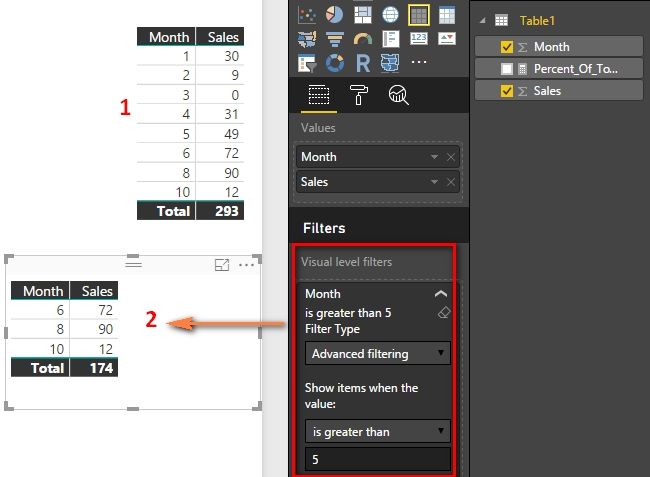
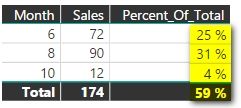
If I understand it correctly, you apply the visual level filter on the second table visual. For example, we have 8 months data as table1, and filter the months as table2. You want to get the percent result (72/293, 90/293 and 12/293), is it right?
If yes, you can create a Measure with following DAX formula.
Percent_Of_Total =
DIVIDE (
SUM ( Table1[Sales] ),
CALCULATE ( SUM ( Table1[Sales] ), ALL ( Table1 ) )
)
Best Regards,
Herbert
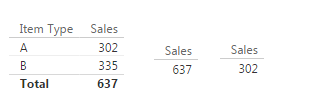
Not quite... In a very simplistic form, Say I have the data above. Items A and B and their respective sales. I have a table with total sales, and I have a table with total sales, but filtered to item A. I need to create a measure to calculate the % of total sales (302/637) to create a third table.
the terminology can be confusing because there are tables at the data model and then again tables as a visual.
As I understand your post: you have 2 data model tables - let's call them 1 & 2.
In your visual you want to dynamically filter Table 1 so it just shows the total of whatever item you select i.e. item A? or is this a permanent calculated value at the data model level?
Table 2 sum is to be static/fixed?
Is the summed amounts the only info that interested you or do you wish to display all the rows that create the sums?
Figured it out.. it was simple as I expected. Still getting comfortable with CALCULATE and FILTER expressions..
PercentA = divide(CALCULATE(sum(Sheet1[Sales]),Sheet1[Item Type]="A"),SUM(Sheet1[Sales]))
@Anonymous
If you have got your problem answered, you could mark the right answer as solution to close this thread. ![]()
Best Regards,
Herbert
I dont know for sure if this will help you, but there good examples of the use of "divide" with filters in this thread.
http://community.powerbi.com/t5/Desktop/Calculation-between-columns-on-a-table/m-p/73322
If you have recently started exploring Fabric, we'd love to hear how it's going. Your feedback can help with product improvements.
A new Power BI DataViz World Championship is coming this June! Don't miss out on submitting your entry.
Share feedback directly with Fabric product managers, participate in targeted research studies and influence the Fabric roadmap.
| User | Count |
|---|---|
| 48 | |
| 43 | |
| 39 | |
| 19 | |
| 17 |
| User | Count |
|---|---|
| 68 | |
| 63 | |
| 31 | |
| 30 | |
| 23 |